
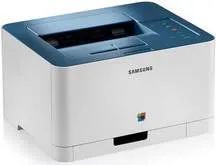
This product has an exclusive design with amazing features that enhance its performance. In terms of the physical dimensions, this printer has a width of 15 inches and a depth of 12.2 inches. Also, the height of the printer is up to 8.3 inches, while its weight is 21.69 lbs. The machine produces various noise levels, depending on the current printer mode. During color printing, for instance, the noise level is less than 45 dB(A) but is less than 48 dB(A) for monochrome printing.
Samsung CLP-360 Drivers for Windows
e4256eca5151a5c923b75e781c763b961f6230ab465a23999eeb417bd58ee27f9130746f2c5b7b6b8cb7f3ee81ed10edd715546f4240c62424303b40f37c4ca02635555fe94822703c536c2ef5ec1c80066393efe498a00702c10f6dfab14ab8595fbab4811aa169fb465fd54aa3a5ee28cdca1ce207ccefe7e5c9ceb61e887e242f2b5aca3359054c919bf0e570852bd0987fe910517674c4af49e1a2dfc7607e9244b9d42a27e6f2c712bfb8addd0bc3e9124da262072b9e9fa5ab73746534Samsung CLP-360 Drivers for macOS
fbfbec7e610c3192885f70c966f5435ab741a2a5774a0c687d95b0e5ffcd1694Samsung CLP-360 Drivers for Linux
0c38213b846644500526bf281caaa6e36c40b8f2241cac2f0398c97c3814540eSamsung CLP-360 Specifications
To also achieve maximum productivity from this machine, the surrounding environment must have certain qualities in place. For instance, the temperature should be between 10 and 32°C during operations. On the other hand, in storage, the recommended temperature range is between 0 and 40°C. Similarly, the relative humidity is another important factor with a recommended range between 20 and 80% during printer operation. However, during storage, the manufacturer allows a range between 10 and 90%.
The power consumption also depends on the printing mode, such as full operation, ready, and power saver modes. By implication, the average operating mode power usage is less than 290 watts. However, the active mode consumes less than 60 watts while the power saver mode uses only less than 1.0 watts. When the Samsung CLP-360 printer is off but still connected to the power source, it still uses about 0.45 watts of power.
Users can also enjoy the compatibility of the printer with diverse media types such as plain, thick, thin, bond, and cards. All these paper types have varying content capacity in the open trays as well as compatible weight limits. For instance, the machine accommodates up to 150 sheets of plain paper of 20 lbs average weight in the input tray. However, it only takes five sheets of thick paper in the same tray at once.
Technical Details
| Title | Samsung CLP-360 Drivers |
|---|---|
| Device Type | Printer |
| Driver Version | Varies by driver and operating system |
| Available Downloads | Drivers |
| License | Free |
| Manufacturer | Samsung Electronics Co., Ltd. |