
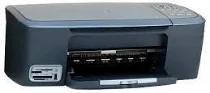
HP PSC 2350 All-in-One Printer cartridges
Black Original Ink HP 94 Cartridge (~480 pages), HP 95 Tri-color Inkjet Print Cartridge (~330 pages), HP 97 Tri-color Original Ink Cartridge (~560 pages), HP 99 Photo Original Ink Cartridge (~130 pages)
HP PSC 2350 Drivers for Windows
34ffd95f68c4ec801b52a49ae558dff87107706170657fe40cdc9807795082aa70fb9c4b9941c166e83b6651f663b7f3a350128607fb7251141c4783540b309e77a47bcb0b2c86adc21ab5cd589a24e2b39200c3ef423daba27a91596ea38bf3HP PSC 2350 Drivers for macOS
990c971e9f7a0aa03e9270fe67df8c773bca17c56281f272a91b75dc2cc4b682c1957a04adf07d18f98881c12437578ea3fe831237073b7883c48c2ae531df14HP PSC 2350
Overview:
The HP PSC 2350 printer is an all-in-one printer that performs multiple functions such as copying, printing, and scanning. This printer is the best option for home, professional and media enterprises. The printer supports various functions such as print, scan, copy, plus viewing photos on an LCD and printing from memory card slots. Enjoy true-to-life quality up to 4800 optimized dpi (dots per inch) and add 6-ink color with laser-quality text.
With this printer, smoothly rotate, crop and remove red-eye from photos using the innovative control panel and color image display. The user can print photos without a PC by connecting PictBridge-enabled cameras to the front USB port or using memory cards and image display. With the HP PSC 2350 printer, create pictures with or without borders and print up to 8.5 x 24 inches.
Printing Specification:
The printer uses Drop-on-demand thermal inkjet technology with a high print speed for black prints of 20 ppm (pages/minute), and the color print speed is 16 ppm (pages/minute). The PSC 2350 has print quality in dots per inch for black & white and color. The print quality for black is up to 600×600 dpi and the print quality for color is up to 1200×1200 dpi with HP PhotoRET III. The printer supports various languages such as HP PCL Level 3, PCL3 GUI or PCL 10. The duty cycle per month is 5000 printed pages per month.
The HP PSC 2350 printer paper tray holds different sizes of paper in the input tray and output tray. The plain paper capacity is 100 pages in the input tray.
Scan Specification:
HP PSC 2350 is an all-in-one printer with a copier. You can scan documents with an optical resolution of 1200 x 4800dpi with the TWAIN-compliant interface. The maximum scan speed varies according to document complexity. This printer uses the HP Photo view center software for scanning documents in a high-quality format. The maximum scan size from the glass is 21.6 x 29.7 cm.
Copy Specification:
The copy scaling is up to 25 to maximum 400% scaling. HP 2350 printer create maximum copies that can make from the original document are 99. There are various copy modes such as fit to page, poster printing, and printing many on pages. The printer copies black and white pages up to 23 copies per minute and in color format up to 18 copies per minute. The printer also supports borderless printing in plain and photo paper type.
Feature of HP PSC 2350 All-in-one printer:
Quickly make a positive impression every time with better reliability, quality, and versatility up to 4800 dpi (dots per inch) with 4-ink color.
1. Print photos up to 8.5 x 24 inches and copy up to 8.5 x 11 inches and 8-by-10-inch and panorama photo papers to frame and display.
2. Enjoy true-to-life images that resist fading longer than traditionally processed photos with 6-ink color printing. Use HP Premium Plus photo papers for bright, vivid prints that preserve your memories for generations.
3. Easily print, scan, and copy. Color image display and one-touch buttons make photo projects fun and easy.
4. Color image display and buttons guide you through a menu of options including photo editing, cropping and red-eye removal, scanning and copying.
5. Using the color image display and editing buttons, easily select, rotate and crop photos, and instantly remove the red-eye mark.
6. Use camera memory cards and the color image display, or HP Photo Proof Sheet to select and print photos. Plus print photos directly from PictBridge-enabled cameras using the front USB port and cable.
Technical Details
| Title | HP PSC 2350 Drivers |
|---|---|
| Device Type | All-in-one printer |
| Driver Version | Varies by driver and operating system |
| Available Downloads | Drivers |
| License | Free |
| Manufacturer | HP Inc. |