
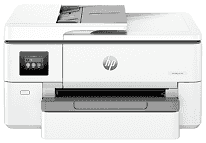
HP OfficeJet Pro 9720 Driver gives the computer access to the printing and scanning hardware in this wide-format all-in-one. Copying is performed at the printer itself, while scan jobs sent to the computer rely on the installed software. A nearby computer can use USB, and Ethernet connects the machine to a wired network. Wireless printing and scanning can use the local Wi-Fi network instead. Correct driver installation also helps the operating system identify the printer properly when jobs are sent or scans are started.
HP OfficeJet Pro 9720 Drivers for Windows
3874b9b7741c11b34bfad1fd69aab67cc6f51c4fb54bf94ff28c89ba0cf09d17620068045902345004931235f980d18321eb73b2b9e83672a905b17b6e82367733a48d17157441a5f626bf8b2b5f85c04c1a524bacff1c548f899ad90978765ec11fe40d2b794ffeb0c9f87b6f22efe7b178646c583b58276f0dc4b24872778a1eea95f7369b1769c558b5241c1699e168c1cd0ecaa3182748ff613c4407316f252f429b15fa67d41bb14261852159a3cedc31429ed4e0f4b0f8d77f325cd9f7b334974dff8c24b8ce9b24aabde122922f969419b3f2b9f6be4ce9e605b888c983d239d64aa753b224ac1a5c229527fba7a264eb3653fb95af54a387b27b3b1bHP OfficeJet Pro 9720 Specifications
The HP OfficeJet Pro 9720 is a wide-format color all-in-one machine for print, scan, and copy work. Printing comes from HP Thermal Inkjet hardware and four pigment-based cartridges: black, cyan, magenta, and yellow. Local settings sit on a 2.7-inch capacitive color touchscreen. For scans, the machine uses a legal-size flatbed and a 35-sheet automatic document feeder, so single pages and small stacks do not need the same handling.
ISO printing runs at 22 ppm in black and 18 ppm in color. Draft mode can move faster, up to 34 ppm, when final quality matters less than speed. Black documents reach 1200 x 1200 rendered dpi. Color output can rise to 4800 x 1200 optimized dpi on HP photo paper. Scanning relies on 1200 dpi optical capture, and copy scaling runs from 25% to 400% for up to 99 copies.
Paper loads from one 250-sheet tray, while finished pages collect in a 75-sheet output tray. Standard office sheets fit there, including Letter, Legal, Executive, Statement, and Tabloid 11 x 17 paper. Smaller photo sheets, envelopes, and cards use the same feed path, so paper changes still happen from the main tray. Automatic two-sided printing is limited to A4 and Letter sheets. Borderless printing can reach A3 or 11 x 17 inches.
A nearby computer can connect through Hi-Speed USB 2.0. Ethernet gives the printer a fixed wired place on the network. Wireless jobs can travel over dual-band 802.11 a/b/g/n/ac Wi-Fi, and Wi-Fi Direct helps when a router connection is not available. Phone and Chromebook printing can use Apple AirPrint, Mopria, Chrome OS, or the HP app. With the output tray closed, the body measures 22.9 x 17.5 x 12.1 inches and weighs 32.19 lb.
Technical Details
| Title | HP OfficeJet Pro 9720 Drivers |
|---|---|
| Device Type | All-in-one printer |
| Driver Version | Varies by driver and operating system |
| Available Downloads | Drivers |
| License | Free |
| Manufacturer | HP Inc. |