
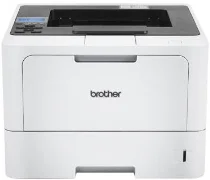
Brother HL-L5228DW Driver helps the computer communicate correctly with this monochrome laser printer during setup and daily printing. After the connection is ready, the computer can identify the machine and send print jobs with matching settings. This HL model is a printer-only device, so its driver page should not describe scanning, copying, or faxing. Proper driver support keeps print commands moving steadily from the computer to the printer for clear document output.
Brother HL-L5228DW Drivers for Windows
0b4c5595547608d00285ac895fe7c9cc17ff045100be47333390345d7fb88158ea9cb7eded63e03a727527d72d152da1a6e9fe36354a6225fc835489af9da3e75876135f8abe6f57a69bb3682c3e01af45e87d70b41b15c4ed8bc451693fdb166eddedfff4131bc903d581f6dc86a8518e1c82980a4cd38b4396c4c1bb1338d3ee2cabe92d46f7f6804a469fbdf46bfefbc58df649a126f936d83c3cc990a4efba40f5efe1d1d3896139bc31bc28b4a3f2e75c76684987239019db6a68d6977d5f3ad9dd0475f7524f0e489aa7076da168c228bcd22031394a53fad4b9a2573f71169ef33cab91b5dc1e848ff483c40ad2eec7be44e69fcb0c084a590a79b49eBrother HL-L5228DW Drivers for macOS
0fbe57cf561951495acd527168f42d7a2cbde47e512d54af248571d8ddd73ccbBrother HL-L5228DW Drivers for Linux
694b6c487411ad659961f6ad216b232b150a8da8a6eb1ecb714c0f4b7f6ba1c0197a050b9e467f650ead7418fe3830348831c14a8ef6709f499cf8901aef1e14Brother HL-L5228DW Specifications
The Brother HL-L5228DW is a monochrome laser printer-only model, so it has no scanning, copying, or fax hardware. An electrophotographic laser engine handles printing, and the controller uses 1 GB of standard memory. The control panel uses a one-line display that shows 10 double-byte or 20 single-byte characters. Wired networking is built in through the printer’s network port. For print jobs, the emulation set covers PCL6, BR-Script3, IBM Proprinter XL, Epson FX-850, PDF 1.7, and XPS 1.0.
Physical print resolution is 600 x 600 dpi, and best mode reaches 1200 x 1200 dpi. From the standard tray, single-sided output runs at up to 50 pages per minute on Letter paper and up to 48 pages per minute on A4. Automatic duplex printing is built in for A4 paper. From ready mode, the first page leaves through the standard tray in less than 6.7 seconds.
Paper loading starts with a 250-sheet standard tray for plain, letterhead, colored, thin, recycled, and thick paper. The 100-sheet multi-purpose tray also accepts bond paper, labels, envelopes, and heavier media. Standard-tray sizes include A4, Letter, Legal, Executive, A5, A6, B5, Folio, 16K, India Legal, Mexico Legal, and A4 Short paper. Optional lower trays can add more cassette capacity. Printed sheets collect in a 150-sheet face-down output area. A one-sheet face-up path is also available.
A nearby computer can connect through Hi-Speed USB 2.0 Type-B. Wired networking uses Gigabit Ethernet, while wireless printing runs through dual-band wireless LAN or Wi-Fi Direct. Wireless infrastructure mode works through IEEE 802.11a/b/g/n, and Wi-Fi Direct uses IEEE 802.11a/g/n. The body measures 373 x 388 x 257 mm and weighs 11.0 kg with supplies installed. During printing, power use is about 670 W. Ready mode uses 31 W, sleep uses 5.5 W, and deep sleep drops consumption to 0.5 W.
Technical Details
| Title | Brother HL-L5228DW Drivers |
|---|---|
| Device Type | Printer |
| Driver Version | Varies by driver and operating system |
| Available Downloads | Drivers |
| License | Free |
| Manufacturer | Brother Industries, Ltd. |