
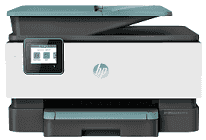
HP OfficeJet Pro 9018 Driver helps the computer communicate correctly with the printer and gives software access to its print, scan, copy, and fax functions. A computer can send jobs over USB or the local network once the connection is configured. Wireless use also keeps scanning available without tying the printer to one nearby computer. The driver carries commands between applications and the printer, including document output and status information.
HP OfficeJet Pro 9018 Drivers for Windows
56758cf61e5ed0de3199cc09eefb44c9db6113043258ed620386a0f251ed317f620068045902345004931235f980d18321eb73b2b9e83672a905b17b6e82367733a48d17157441a5f626bf8b2b5f85c04c1a524bacff1c548f899ad90978765ec11fe40d2b794ffeb0c9f87b6f22efe7b178646c583b58276f0dc4b24872778aa211b51894cab560a391827659181bc2316121c7f452e20acada50473e42a79f83d239d64aa753b224ac1a5c229527fba7a264eb3653fb95af54a387b27b3b1b83d239d64aa753b224ac1a5c229527fba7a264eb3653fb95af54a387b27b3b1bHP OfficeJet Pro 9018 Specifications
The HP OfficeJet Pro 9018 combines color printing with scanning, copying, and faxing. Printing comes from HP Thermal Inkjet hardware using separate black, cyan, magenta, and yellow cartridges. A 2.7-inch capacitive color touchscreen sits on the control panel for local settings and jobs. For originals, the scanner pairs a flatbed with a 35-sheet automatic document feeder that can process two-sided pages.
Professional-mode output reaches up to 22 ppm in black and 18 ppm in color. Black documents can be rendered at up to 1200 x 1200 dpi. On supported HP photo paper, optimized color quality rises to 4800 x 1200 dpi. The CIS scanner has an optical resolution of up to 1200 dpi, and Legal-size originals can pass through the document feeder rather than being limited to the flatbed.
The main paper tray holds 250 sheets for everyday printing. Printed pages collect in a 60-sheet output tray, so the output side fills sooner than the input tray during longer jobs. Automatic duplex printing turns the sheet internally for two-sided documents. Borderless output is available up to Letter or A4 size. The same input tray can also take envelopes, cards, photo sheets, and brochure paper.
A nearby computer can connect over USB 2.0, and the printer also carries a host USB port. Network jobs can use Ethernet or 802.11a/b/g/n Wi-Fi. Wi-Fi Direct gives compatible devices a direct wireless route without relying on the normal network connection, and mobile printing is available through Apple AirPrint and Mopria. Two RJ-11 ports belong to the fax hardware. HP rates the monthly duty cycle at up to 25,000 pages but recommends a regular monthly volume of up to 1,500 pages.
Technical Details
| Title | HP OfficeJet Pro 9018 Drivers |
|---|---|
| Device Type | All-in-one printer |
| Driver Version | Varies by driver and operating system |
| Available Downloads | Drivers |
| License | Free |
| Manufacturer | HP Inc. |