
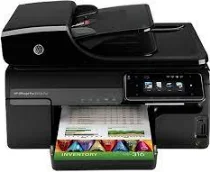
Microsoft Windows XP Service Pack II, Windows Vista and Windows 7 are the supported operating system versions for Windows. Windows XP (32-bit) requires an Intel Pentium II or Celeron processor while HP recommends Intel Pentium III or higher. Microsoft Windows Vista requires an 800 MHz 32-bit or 64-bit processor, but HP recommends a 1 GHz processor. For systems running on Windows 7, a 1 GHz processor works best while the manufacturer recommends a 1.5 GHz processor.
HP Officejet Pro 8500A Plus Drivers for Windows
8add1f3c0b42e4cc9b2fb99be3403f9161f6ae333560f79ddff026a8cc1c4ece8f29dcfc3d83477b06095be935f49d6559aabf6e355f42c6e8e4bfe9a233142d0cf033f7c45bcf8bd2d7deb736d9244fb82560dee91568d5c6a340751cd334d3d2f18088da8df16f0017983756626431eeeeddb0e386dd19a223c89e5a6a9c4fce728403422ec1c590fb971561abec94e476484815326373058a39afd61bccc2e2a9a96fe5fd24d2cbc8868efaa9de956f88983424e4abe9222281383765316665600b3146322a625534e02a701fc04e05403b71f61f358d6358f868ffc1c676HP Officejet Pro 8500A Plus Drivers for macOS
cba1598dc5d03fbf28fa649dafca5cd251f273066cc3a050966834a73ba66c3e8837b0ac4a4886c0c0b5128138837a104e92977c4acc4b0b46de05b0efe3384ac655ea4b5feae7d8da4a95bab25ca07bdf6244640bc4aa64b684e0441648d2853630babfef4fe73a499de913e1524cca80cc7a9d1c6ff7221ad69af49ee9c00bHP Officejet Pro 8500A Plus Specifications
The required RAM size for Windows XP is 128 MB while HP recommends 512 MB. Windows Vista requires a minimum of 512 MB, but the manufacturer recommends 1 GB of RAM. For Windows 7, 1 GB of RAM must be in place, but HP recommends 2 GB. The free hard disk space for Windows XP is 750 MB (minimum), but HP recommends 850 MB. For Windows Vista, 2 GB of open hard disk space is crucial, but HP recommends 2.5 GB of disk space. Windows 7 requires 1.5 GB but recommends 2 GB of hard disk free space.
The printer belongs to the HP Office family, which includes:
1. HP Officejet Pro 8500A all-in-one Printer – A910a and A910d with product numbers CM755A, CQ721A, and CQ840A
2. HP Officejet Pro 8500A Plus all-in-one Printer series A910g and A910k with product numbers CM756A, CQ722A and CQ841A
3. HP Officejet Pro 8500A Premium all-in-one with product number CM758A
The physical dimensions are 12.1 x 19.8 x 18.6 inches (HWD), while with the tray out, the height is 14.7 inches. The weight of the printer is 27.1 lbs with the duplexer but 33.1 lbs with the second tray. The machine is an all-in-one device with the ability to not only print but also copy, scan, send and receive fax messages. The power option is with a Universal Power Adapter with 100 to 240 VAC at 50/60 Hz.
Printheads and Cartridges
The compatible printheads include HP 940 Black/Yellow Officejet Printhead with part number C4900A. The other is the HP 940 Magenta/Cyan Officejet Printhead with part number C4901A. Usable cartridges include
1. HP 940XL Black Officejet Ink Cartridge
2. HP 940 Black Officejet Ink Cartridge (for North America only)
3. Cyan Officejet Ink HP 940XL Cartridge
4. HP 940 Cyan Officejet Ink Cartridge (for North America only)
5. HP 940XL Magenta Officejet Ink Cartridge
6. HP 940 Magenta Officejet Ink Cartridge (for North America only)
7. HP 940XL Yellow Officejet Ink Cartridge
8. HP 940 Yellow Officejet Ink Cartridge (for North America only)
Connectivity
The central connectivity is through the Hi-Speed USB 2.0. The alternative is an embedded networking port. In addition to these, the printer can work with memory cards adaptable for card slots and PictBridge.
Paper Handling
The printer supports various paper sizes and types including Plain paper, Transparencies, Cards, Banners, Envelopes, etc. The input tray has up to 250 sheets of plain paper capacity while the output tray holds 150 sheets. There is an extra tray of up to 250 sheets which is an optional accessory. The Automatic Document Feeder (ADF) of this printer holds about 50 sheets of paper.
Limitations
1. There is no duplexer unit in the printer
2. No USB printer cable is in the printer package
Technical Details
| Title | HP Officejet Pro 8500A Plus Drivers |
|---|---|
| Device Type | All-in-one printer |
| Driver Version | Varies by driver and operating system |
| Available Downloads | Drivers |
| License | Free |
| Manufacturer | HP Inc. |