
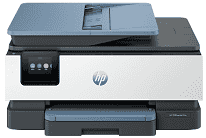
HP OfficeJet Pro 8120 Driver helps the computer identify this all-in-one printer for everyday use. After installation, print jobs and scan commands can reach the machine correctly. Copying stays on the printer itself, while fax functions still need the right driver support for the computer side. A wired setup uses USB, and wireless printing depends on the network connection chosen during setup.
HP OfficeJet Pro 8120 Drivers for Windows
3a41824a13217feb587abbe5bf3eb2a8fffb3a4f7ec7e45f3e9aedd09dcf1091620068045902345004931235f980d18321eb73b2b9e83672a905b17b6e82367733a48d17157441a5f626bf8b2b5f85c04c1a524bacff1c548f899ad90978765ec11fe40d2b794ffeb0c9f87b6f22efe7b178646c583b58276f0dc4b24872778a1eea95f7369b1769c558b5241c1699e168c1cd0ecaa3182748ff613c4407316fb334974dff8c24b8ce9b24aabde122922f969419b3f2b9f6be4ce9e605b888c983d239d64aa753b224ac1a5c229527fba7a264eb3653fb95af54a387b27b3b1bHP OfficeJet Pro 8120 Specifications
The HP OfficeJet Pro 8120 is a colour thermal inkjet all-in-one for printing, scanning, and copying. Fax hardware is not fitted. Four separate HP 925 cartridges supply black, cyan, magenta, and yellow ink, so each colour can be replaced on its own. A 2.7-inch capacitive colour touchscreen controls the machine, backed by a 1.2 GHz processor and 256 MB of memory.
Black documents can be rendered at up to 1200 x 1200 dpi. Colour output reaches an optimized 4800 x 1200 dpi on HP Advanced Photo Paper when the source resolution is 1200 x 1200 dpi. ISO speeds reach 20 ppm in black and 10 ppm in colour. The first page takes about 15 seconds for black or 18 seconds for colour from ready mode, and automatic duplexing turns ordinary sheets without manual handling.
Scanning relies on a CIS flatbed for originals up to 215.9 x 297 mm. Longer pages fit in the 35-sheet automatic document feeder, which accepts originals up to 215.9 x 355.6 mm but scans only one side in each pass. Resolution reaches 1200 dpi in optical, hardware, and enhanced modes. Copies run at up to 12 cpm in black or 6 cpm in colour, with resizing from 25% to 400% and batches of up to 99 copies.
The main tray holds 225 sheets, although the output tray collects only 60 printed pages. Standard office sizes such as A4, A5, A6, and B5 JIS fit alongside photo paper and cards. Envelopes and custom sheets from 76.2 x 127 mm to 215.9 x 355.6 mm use the same feed. A nearby computer can connect by Hi-Speed USB 2.0 or Ethernet. Wireless jobs can travel over dual-band Wi-Fi, and Wi-Fi Direct remains useful when no router connection is available. AirPrint, Mopria, and the HP app provide mobile printing routes.
Technical Details
| Title | HP OfficeJet Pro 8120 Drivers |
|---|---|
| Device Type | All-in-one printer |
| Driver Version | Varies by driver and operating system |
| Available Downloads | Drivers |
| License | Free |
| Manufacturer | HP Inc. |