
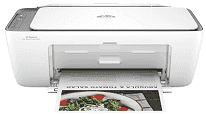
HP DeskJet Ink Advantage Ultra 4926 Driver helps the computer identify this all-in-one printer for printing, scanning, and copying. Print commands depend on that software link before pages move from the queue to the printer. The scanner also needs the correct driver support, especially when the computer must read the flatbed and save the scanned file properly. Copying stays on the printer itself, but full setup keeps the device recognized when print and scan tasks come from the computer. Wireless use still depends on a steady connection between the printer and the system.
HP DeskJet Ink Advantage Ultra 4926 Drivers for Windows
620068045902345004931235f980d18321eb73b2b9e83672a905b17b6e82367733a48d17157441a5f626bf8b2b5f85c04c1a524bacff1c548f899ad90978765ec11fe40d2b794ffeb0c9f87b6f22efe7b178646c583b58276f0dc4b24872778a83d239d64aa753b224ac1a5c229527fba7a264eb3653fb95af54a387b27b3b1bHP DeskJet Ink Advantage Ultra 4926 Specifications
HP DeskJet Ink Advantage Ultra 4926 is a colour thermal inkjet all-in-one with print, scan, and copy hardware in the same body. Ink comes from two HP 47 cartridges: black in one slot and tri-colour in the other. The control panel uses an icon LCD rather than a touchscreen. Inside, a 1.0 GHz processor works with 64 MB DDR1 memory and 24 MB flash storage.
Black printing reaches 1200 x 1200 rendered dpi. Colour jobs can climb to 4800 x 1200 optimized dpi on HP photo paper, so the higher figure depends on the right paper and print setting. ISO speed is 8.5 ppm for black A4 pages and 5.5 ppm for colour. Draft mode moves faster at 20 ppm black or 16 ppm colour, but it is meant for quicker output rather than best quality. From ready mode, the first A4 page comes out in 15 seconds for black or 19 seconds for colour.
Scanning relies on CIS hardware, with both a flatbed and an automatic document feeder available. The flatbed takes originals up to 216 x 297 mm. Longer pages go through the ADF, which accepts up to 215.9 x 355.6 mm for legal-size scanning. Optical scan resolution reaches 1200 dpi. Copying is slower than printing, at 6 cpm black or 3 cpm colour, and one copy job can produce up to 9 pages at 300 x 300 dpi.
Paper loads from a 60-sheet input tray, so this is built for light document batches rather than long unattended runs. Printed pages collect in a 25-sheet output tray. Standard sheets include A4, B5, and A6, and DL envelopes use the same feed path. Custom paper can run from 76 x 127 mm up to 215 x 355 mm. Borderless printing is not part of this model. A nearby computer can connect through USB 2.0, and wireless printing runs over Wi-Fi. With the trays closed, the body measures 425 x 304 x 154 mm and weighs 3.42 kg.
Technical Details
| Title | HP DeskJet Ink Advantage Ultra 4926 Drivers |
|---|---|
| Device Type | All-in-one printer |
| Driver Version | Varies by driver and operating system |
| Available Downloads | Drivers |
| License | Free |
| Manufacturer | HP Inc. |