
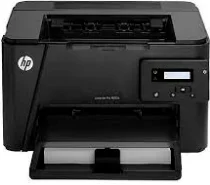
The printer, HP LaserJet Pro M202n, is a single-function laser printer for both home and office. Plenty of built-in and security features are available in the device. The printer is also capable of printing from mobile phones, tablets, and laptops or PCs with mobile printing capabilities. Secure wireless connectivity services are given in the printer. A two-sided automatic printing feature is also provided in the printer.
HP LaserJet Pro M202n Drivers for Windows
494e733224815ea9649a9441d4f30f3e363c967bedbe3530d115553c7b20f06885cb640b310f3e8075c64fcb9e667487bdc3811980a38a3ddee1a33daa88b2695120fe032cb4a02a7648af030e627c3bc5349b0386874b9768d0e1075d7ca519eb727293767ac87183406c24c35cea7756c5b4acbcd130e968e6f166c6c95c08bea1ab4fb7079681cb60e7dcc19ffdcaa8f955a7b4c018f4b44c5ff05cf20973b5e03eff7772b8ff14e6bc09e7d3ece79fdc058ac93e597d4de58ea65cd131a1680967e8c32026bc2071ce27a65e55a2e26501f405a8a09c0324f59a974f1cc2252e3bb84737038c907650b13a150fe34cfaddc5810fa8a17e29b0e1e3e49fed9086a918c0d2b80dc034ad79fe64f90fc0fb244fb9ed7af2c3c9e71cf03979831088425bc237bfabaf7ff8fedb6675d2bc6a55836caa899688eda82c404247313e1529cc2cf7f249d20d574f41e6d32f7e9ce1341e11553bec91c6fa19a34663HP LaserJet Pro M202n Drivers for macOS
cba1598dc5d03fbf28fa649dafca5cd251f273066cc3a050966834a73ba66c3eafbb2e35f228149b85f6fe1e6e5cbf218204c8b276b2e710487dc413235de5d3HP LaserJet Pro M202n Specifications
The design of this series’s printers is almost the same, but there are two or three different features in every model of the series. The HP LaserJet Pro M202n has a compact design which makes it easier to carry from one place to another. The input and output capacity of the product is also sufficient for home and office use. The device is only 5.9 kg, which is not much as compared to the heavyweight big-size printers. A convenient 2-line LCD panel for control is on the front side.
LaserJet Pro M202n cartridges
HP 83A Black Toner Cartridge (~1500 pages)
The processor speed of HP LaserJet Pro M202n is 750MHz, and memory space is 128 MB. The printer doesn’t support copying, scanning, and faxing features.
Printing and Connectivity
The printer has a printing speed of 26 pages/ minute. The automatic two-sided printing capability saves the paper cost and time. The duty cycle of the printer is 8000 pages/ month.
The Connectivity feature of the printer consists of a hi-speed USB 2.0 port and an Ethernet port. The additional feature of mobile connectivity enables the printer to get a command from any Smartphone. The Apple AirPrint features that help the printer to get the command from Apple devices are not available in this model.
Minimum System Requirements
The minimum requirements for Windows OS and Mac OS are Windows Vista, Windows 7, 8 and 10, Mac OS 10.12, OS X 10.11, and some others. The system requires a 64-bit processor at a minimum, and the RAM can vary according to the device. The free disk space for the compatible device is 2 GB for Windows Vista, 8, 7, and 10, and 200 MB for Windows XP.
Cartridges and Paper Handling Specifications
The cartridges for replacement are HP 83A Toner Cartridge, HP 88A Toner Cartridge, and HP 83X Toner Cartridge. The paper handling of the device must be accurate as the overloading of the trays will result in paper wastage. The priority tray has a capacity of 10 sheets. The input tray has a capacity of 250 sheets of plain paper. The capacity of the output tray is 150 sheets. The correct paper weight and amount are critical to keep in mind while using the device.
Environmental Specifications
The operating condition of the device ranges from 62.6ᵒF to 77ᵒF. The humidity level is 30% to 70%. The environmental conditions of the printer may vary due to the workload on the device combined with temperature and humidity. The Energy Star mode in the printer is to reduce the consumption of energy without compromising the quality.
Summary
The printer HP LaserJet Pro M202n comes with a lot of advanced features to facilitate a better working experience and has good quality documentation. The device comes with a 1-year warranty that offers a full replacement of the device in case of damage or malfunctioning. The printer also has an Energy Star rating, which describes its energy-saving quality. A Recycling Program is offered for the return of the product. Then the product is recycled and reused by Electronic Recycling Centers worldwide. The company conserves the resources by reselling the most popular products.
Technical Details
| Title | HP LaserJet Pro M202n Drivers |
|---|---|
| Device Type | Printer |
| Driver Version | Varies by driver and operating system |
| Available Downloads | Drivers |
| License | Free |
| Manufacturer | HP Inc. |