
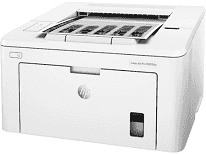
One of the basic specifications of this printer is its unique design for holding a large amount of paper. The input tray capacity is up to 250 sheets of plain paper of an average weight of 20 lbs. Furthermore, the same tray can take up to 10 envelope sheets while the output tray will only take 150 sheets. In this way, the media sizes include A4, legal, letter, A5, B5, and other standard as well as custom sizes.
HP LaserJet Pro M203dn Drivers for Windows
da0413cd660c23df2d63653471c4d7055d73ede32cb99fd08d54edfca904522649a5901971b05f8b0977da8e7cc6b2f1b2b36cffe0bee21804a5115ca2fcef45c7563309be0906f2ce1011c0b0713a87207a0787b484bbf29dff74b181ad2ec8eb727293767ac87183406c24c35cea7756c5b4acbcd130e968e6f166c6c95c08bea1ab4fb7079681cb60e7dcc19ffdcaa8f955a7b4c018f4b44c5ff05cf20973b5e03eff7772b8ff14e6bc09e7d3ece79fdc058ac93e597d4de58ea65cd131a1680967e8c32026bc2071ce27a65e55a2e26501f405a8a09c0324f59a974f1cc2252e3bb84737038c907650b13a150fe34cfaddc5810fa8a17e29b0e1e3e49fed9086a918c0d2b80dc034ad79fe64f90fc0fb244fb9ed7af2c3c9e71cf03979831088425bc237bfabaf7ff8fedb6675d2bc6a55836caa899688eda82c404247313e1529cc2cf7f249d20d574f41e6d32f7e9ce1341e11553bec91c6fa19a34663f50dad657f400372a066f31d5596db54ad4d289fdcdaf11f1209f7c83f8ebfaef50dad657f400372a066f31d5596db54ad4d289fdcdaf11f1209f7c83f8ebfaef50dad657f400372a066f31d5596db54ad4d289fdcdaf11f1209f7c83f8ebfaeHP LaserJet Pro M203dn Drivers for macOS
99e1d18847c64a405486ae34424f0a1c8d89920d17df86c45b6b0007f101d70aThe supported media types apart from plain paper are glossy, rough, vellum, laser, and other common variants of print paper. The accommodated media weight in this printer for use includes 60 to 163 gsm or 16 to 43 lbs. Similarly, the recommended weight for the automatic duplexer is between 16 and 28 lbs as well. The function of the duplexer is to enable the machine to print on both sides of a page of paper.
For the physical dimensions of the printer sides, the measurements include a width of 14.6, and the depth is 16 inches. It also has a height of about 8.8 inches, and the weight is 6.9 kg, which is equivalent to 15.2 lbs. The exceptional power qualities include an energy savings feature through an auto-on and auto-off power control technology. This feature is through an internal power supply within the range of 110 to 127 volts of an alternating current (AC).
The printing components also include one black print cartridge and a drum component for optimum performance. In terms of the replacement cartridges, the options are HP 30A and 30X original black LaserJet toner cartridges. These cartridges have different identifier codes and different print capacity. Generally, the HP LaserJet Pro M203dn model uses the laser print technology with an automatic duplexer component. It can also produce up to 30,000 pages at the very maximum print capacity.
Technical Details
| Title | HP LaserJet Pro M203dn Drivers |
|---|---|
| Device Type | Printer |
| Driver Version | Varies by driver and operating system |
| Available Downloads | Drivers |
| License | Free |
| Manufacturer | HP Inc. |