
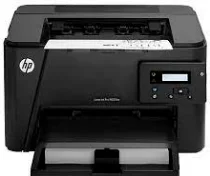
The HP LaserJet Pro M202dw works with laser technology to produce a top-quality print at high speed. This print technology works with the PCL 5C, PCL 6, PS, PCL3 GUI, PCLm print languages. The display is a 196 x 34 LCD screen.
HP LaserJet Pro M202dw Drivers for Windows
494e733224815ea9649a9441d4f30f3e363c967bedbe3530d115553c7b20f06885cb640b310f3e8075c64fcb9e667487bdc3811980a38a3ddee1a33daa88b2695120fe032cb4a02a7648af030e627c3bc5349b0386874b9768d0e1075d7ca519eb727293767ac87183406c24c35cea7756c5b4acbcd130e968e6f166c6c95c08bea1ab4fb7079681cb60e7dcc19ffdcaa8f955a7b4c018f4b44c5ff05cf20973b5e03eff7772b8ff14e6bc09e7d3ece79fdc058ac93e597d4de58ea65cd131a1680967e8c32026bc2071ce27a65e55a2e26501f405a8a09c0324f59a974f1cc2252e3bb84737038c907650b13a150fe34cfaddc5810fa8a17e29b0e1e3e49fed9086a918c0d2b80dc034ad79fe64f90fc0fb244fb9ed7af2c3c9e71cf03979831088425bc237bfabaf7ff8fedb6675d2bc6a55836caa899688eda82c404247313e1529cc2cf7f249d20d574f41e6d32f7e9ce1341e11553bec91c6fa19a34663HP LaserJet Pro M202dw Drivers for macOS
cba1598dc5d03fbf28fa649dafca5cd251f273066cc3a050966834a73ba66c3eafbb2e35f228149b85f6fe1e6e5cbf218204c8b276b2e710487dc413235de5d3HP LaserJet Pro M202dw Specifications
The regular print speed is up to 25 ppm. The printer releases the first page in just about 8 seconds. The best print quality resolution is up to 1200 x 1200 dpi. This high print resolution is possible due to the HP ProRes 1200, HP FastRes 1200, 600 dpi technologies. HP LaserJet Pro M202dw has a theoretical duty cycle of up to 30,000 pages, but only 250 – 2000 pages are recommended.
The printer’s dimensions include 384 x 280.7 x 250.9 mm (WDH), and it weighs 6.6 Kg. All these give it a moderate size and make it very suitable for office work.
HP LaserJet Pro M202dw cartridges
HP83A Black Toner Cartridge (~1500 pages)
Supported drivers
You can download the full printer software and drivers that include all the tools you need for the printer to perform smoothly and at its best. There are two fundamental printer drivers, depending on the model class. Other Utilities include
1. HP Universal Print Driver for Windows PCL6 (64-bit) (File size – 17.8 MB)
2. HP Universal Print Driver for Windows PostScript (64-bit) (File size – 18.8 MB)
3. HP Universal Print Driver for Windows PCL6 (64-bit) for USB connected printers (File size – 17.9 MB)
4. HP Universal Print Driver for Windows PostScript (64-bit) for USB connected printers (File size – 19.0 MB)
5. HP LaserJet Pro M201/M202 series Firmware Update Utility (File size – 15.6 MB)
6. HP Printer Administrator Resource Kit (File size – 17.7 MB)
Driver Installation Instructions
Before installing, please DO NOT connect the USB cable yet
1. Ensure you close all programs that are running on your system before you begin installation
2. Turn on the printer but DO NOT connect the USB cable yet
3. Download the appropriate software, compatible with your operating system
4. Run the file after downloading by navigating to the destination folder and double-clicking
5. The data will extract itself automatically, and installation will begin
6. Follow the dialog box command to finish installation
Connectivity
A Hi-Speed Universal Serial Bus (USB) 1.1 or 2.0 port is available. In addition to this, 1 Ethernet 10/100 port is available for networking the printer with another device.
Mobile Printing
The HP LaserJet M202dw printer is compatible with HP ePrint and Wireless Direct printing.
System requirements
Windows requirement
The supported operating systems include:
1. Windows 10 (32 and 64-bit)
2. Windows 8.1 (32 and 64-bit)
3. Microsoft Windows 8 (32 and 64-bit)
4. Windows 7 (32 or 64-bit)
5. Windows Vista (32 or 64-bit)
6. Windows Server 2008 (32 or 64-bit)
For the operating systems above, the recommended requirements include a 1 GHz 32-bit or 64-bit processor, a RAM size of 1 GB (32-bit) and 2 GB RAM (64-bit). In addition to this, 400 MB of free hard disk space must be available.
For Microsoft Windows XP (32-bit) (SP2 or higher version), the requirements include an Intel Pentium 233 MHz processor, a RAM size of 512 MB plus 400 MB of free hard disk space that must be available.
If your PC runs on Windows Server 2003 (32-bit) (SP1 or higher) or Windows Server 2003 R2 (32-bit), the required processor is 1 GHz (32-bit) (x86), and the required RAM is 1 GB (32-bit). In addition to this, 400 MB of free hard disk space should be available.
For Macintosh systems, the supported versions include:
1. OS X v 10.7 Lion
2. OS X v 10.8 Mountain Lion
3. OS X v 10.9 Mavericks
All of these versions above must have at least a 1 GB hard disk available and be compatible with both the USB and the Internet.
Paper Handling
The standard input tray can accommodate about 250 sheets of plain paper with a 10-sheet priority, whereas the output tray takes a paper load of up to 150 sheets of plain paper as well. It supports duplex printing which allows printing on both sides of the paper. The recommended paper sizes include A4, A5, A6, B5, B6, postcards and envelopes. Apart from these basic sizes, the other types include labels, transparencies, and labels.
Disadvantage
The printer lacks wireless connectivity
Technical Details
| Title | HP LaserJet Pro M202dw Drivers |
|---|---|
| Device Type | Printer |
| Driver Version | Varies by driver and operating system |
| Available Downloads | Drivers |
| License | Free |
| Manufacturer | HP Inc. |