
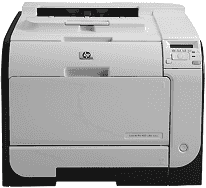
This printer belongs to the HP LaserJet Pro 400 color M451 and HP LaserJet Pro 300 color M351 printer series. These series have duplex printing that helps to print on both sides of the paper automatically. This feature helps to save the document in economic distribution.
Outstanding features of this printer include a top-drawer print performance. This feature involves a print speed of 20 pages per minute (ppm) on A4-size paper and 21 ppm on letter-size paper. Also, the connectivity options include hi-speed USB 2.0, 10/100 Ethernet LAN connection and wireless network connection.
HP LaserJet Pro 400 color M451nw Drivers for Windows
91a35dcf5667a21dcbfef7a1976e49a3bf321a26041b6be9acfd3812367bc093527e6827437e84a83b5f64b362b6523051de56b5c6579adb4ea394b24353b74bd2f18088da8df16f0017983756626431eeeeddb0e386dd19a223c89e5a6a9c4fce728403422ec1c590fb971561abec94e476484815326373058a39afd61bccc2eb727293767ac87183406c24c35cea7756c5b4acbcd130e968e6f166c6c95c08bea1ab4fb7079681cb60e7dcc19ffdcaa8f955a7b4c018f4b44c5ff05cf20973b5e03eff7772b8ff14e6bc09e7d3ece79fdc058ac93e597d4de58ea65cd131a1680967e8c32026bc2071ce27a65e55a2e26501f405a8a09c0324f59a974f1cc2252e3bb84737038c907650b13a150fe34cfaddc5810fa8a17e29b0e1e3e49fed9086a918c0d2b80dc034ad79fe64f90fc0fb244fb9ed7af2c3c9e71cf03979831088425bc237bfabaf7ff8fedb6675d2bc6a55836caa899688eda82c404247313e1529cc2cf7f249d20d574f41e6d32f7e9ce1341e11553bec91c6fa19a34663HP LaserJet Pro 400 color M451nw Drivers for macOS
99e1d18847c64a405486ae34424f0a1c8d89920d17df86c45b6b0007f101d70a230f1f96260d4d568b1cee04900286809260ce47c0089bb9b1ee9d012e8f6bdecba1598dc5d03fbf28fa649dafca5cd251f273066cc3a050966834a73ba66c3ea849cbc1af085f3b468d5b261b6042baa58b383638fa7a79c9137f1ce167512906106aee58b2bd5bd427da5171552e0bb923bbfcb051744f9cc8f332169846b3HP LaserJet Pro 400 color M451nw toner cartridge.
HP305A Black LaserJet Toner Cartridge (~2200 pages ), HP 305A Cyan LaserJet Toner Cartridge (~2600 pages ), HP 305A Magenta LaserJet Toner Cartridge (~2600 pages ), HP 305A Yellow LaserJet Toner Cartridge (~2600 pages )
HP LaserJet Pro 400 color M451nw driver supports some Windows operating systems such as Windows 11, 10, 8.1, 8, 7, Vista, XP 32-bit and 64-bit. The compatible printer drivers include HP PCL 6, HP Universal Print Driver for Windows Postscript and PCL 5. The compatible Mac operating system versions include Mac OS X 10.5 and later, as well as OS X v10.6. These versions support an Intel Core processor.
In case users have other operating systems apart from Windows and Macintosh, it supports UNIX and Linux. However, it requires software such as HP-UX and Solaris networks through the HP JetDirect printer installer for UNIX. Links are available for users to download the appropriate software and drivers.
The printing of multiple pages per sheet can also save paper by printing pages of a document side by side. Users can access this feature through the printer driver, and they can also recycle used materials. By using the HP Partners return process, users can recycle print cartridges.
The energy savings feature involves an instant-on fusing technology and a sleep mode. This feature enables the product to enter reduced power states when the printer is not in use. The print cartridges are also easy to install and remove with one hand when they run out.
Technical Details
| Title | HP LaserJet Pro 400 color M451nw Drivers |
|---|---|
| Device Type | Printer |
| Driver Version | Varies by driver and operating system |
| Available Downloads | Drivers |
| License | Free |
| Manufacturer | HP Inc. |