
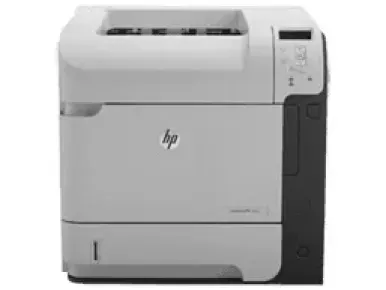
HP LaserJet Enterprise 600 M601dn printer is well known for some essential features such as an embedded HP JetDirect networking. The model part number of this printer is CE990A, and it especially supports duplex printing with an external accessory. Other exciting features also include an online user guide which enables users to access text screen readers.
HP LaserJet Enterprise 600 M601dn Drivers for Windows
33ff2b4888bc149044653b59e637ae80c3d84638aa235df17584ba2f12ca879336c544e680b2474fc6a8a5f8322277d6f44e23b13d8ab8c8940568aeb1aefdd863d9ebffee70c4f4502d0bd945266ca1abdc13880102ea07b2d35960e6333112d2f18088da8df16f0017983756626431eeeeddb0e386dd19a223c89e5a6a9c4fce728403422ec1c590fb971561abec94e476484815326373058a39afd61bccc2ffd4461878d45eaec730b237a247946f968fd4a9e51a03d7c49775cefdfbc61aa64a14568e484b3d08f3338dc709287193f7b7cd8f109518b28c3ae0701bc69f822ffbb02f33a5d18f8485b0674c35efc801e8890cf1dde41137c0956a7eed880693173d8d1f6947263cafc7c835af79ba70153feb0bd4453f557497c24c8930037d971359cf89f9333e8ee9616e32b360ad424519b4d9f60f41c63e02b26e4341828dc31c13c10f42f9a3d38f98e3306b0acae2a60b9228f4f8561f6e56e2c8f938a5f1efeb1cfbcc16a16e890240bbc89428f0d5a90a0ecc9b1f35e3983d1074a380a23437c4fefad00a5e8eb4e07567573dcbb0252028ec8cb705964e9a77dbd500b65648de46c47dff9938f43a085dbcc073ea01aedf250a97eff842d8d2df77000f993a4c410689f22ac064f74dbe6f0ed6c034503cdc9934d7c1b8a763HP LaserJet Enterprise 600 M601dn Drivers for macOS
8f24fa0f77e76f4013f26fd7fb8b50a43bcee1cf14873746a0f571d0222a0db26e29340fb471ab6abc13526622ce1b74ca4eb062f8c7c0c7c80416fda0d30780cba1598dc5d03fbf28fa649dafca5cd251f273066cc3a050966834a73ba66c3ee361f24d92eb3e01d74d464194c00c2861b4cdffc53a344ce7c97a9f0b94f6eaHP LaserJet Enterprise 600 M601dn Specifications
This accessory enables the printer to print on both sides of the paper and ultimately saves paper by default. This printer is also well-known for saving paper by printing two or more pages side-by-side on just one sheet of paper. This feature is accessible through the printer driver.
HP LaserJet Enterprise 600 M601dn toner cartridge.
HP90A Black LaserJet Toner Cartridge (~10000 pages)
The HP LaserJet Enterprise 600 M601dn driver connectivity options include a hi-speed USB 2.0 port and reliable support for walk-up USB printing port. The printer also allows the user to use its storage features for easy print. Drivers are available for Windows XP to Windows 11 and macOS 10.5 to 15 in the download section on this page. The print languages include HP PCL 6 (by default), HP postscript emulation Universal Print Driver (HP UPD PS). HP PCL 5 and HP PCL 6 Universal Print Drivers are also very applicable.
Also, it has an in-built random-access memory (RAM) of 512 MB size, but that is expandable to 1 GB. The device is capable of not only printing in black, but also in cyan, magenta and yellow colors. The print speed is about 45 pages per minute (ppm) on letter size paper while it takes 43 ppm for A4 size paper. It has two main input trays.
The first tray holds about 100 sheets of plain paper while tray 2 holds up to 500 sheets. The output tray, however, can hold up to 500 sheets of printed pages in a face-down position while it holds up to 100 sheets in the face-up output tray.
Technical Details
| Title | HP LaserJet Enterprise 600 M601dn Drivers |
|---|---|
| Device Type | Printer |
| Driver Version | Varies by driver and operating system |
| Available Downloads | Drivers |
| License | Free |
| Manufacturer | HP Inc. |