
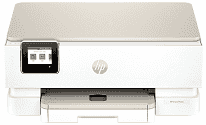
HP Envy Photo 7275 Driver helps a computer identify this all-in-one printer during setup and regular use. After recognition, document and photo jobs can reach the printer with the right software controls. The same setup also opens access to the flatbed scanner and copy functions. A USB cable suits a nearby computer, while wireless setup lets print and scan commands move across the network more reliably.
HP Envy Photo 7275 Drivers for Windows
8ff08f1bf331da78764c76a67c5dd182c6016d462c356ff570ca2e9c6a9b10a2620068045902345004931235f980d18321eb73b2b9e83672a905b17b6e82367733a48d17157441a5f626bf8b2b5f85c04c1a524bacff1c548f899ad90978765ec11fe40d2b794ffeb0c9f87b6f22efe7b178646c583b58276f0dc4b24872778a83d239d64aa753b224ac1a5c229527fba7a264eb3653fb95af54a387b27b3b1bHP Envy Photo 7275 Specifications
The HP Envy Photo 7275 is a color inkjet all-in-one for documents, copies, scans, and photos. Its printhead uses one black cartridge and one tri-color cartridge. A 2.7-inch color touchscreen sits on the control panel. For scanning, the flatbed takes single originals, and the 35-sheet automatic document feeder moves through longer sets without placing every page on the glass.
Document printing reaches 15 ISO ppm in black and 10 ISO ppm in color. A black page takes about 18 seconds to appear from ready mode; color takes about 20 seconds. Black output can reach 1200 x 1200 rendered dpi. For color, the highest setting is 4800 x 1200 optimized dpi when the computer supplies 1200 input dpi.
The scanner records at up to 1200 dpi optical resolution, and HP lists the hardware figure as 1200 x 1200 dpi. Originals on the glass can measure up to 8.5 x 11.7 inches. Scan files may be stored as JPG, BMP, TIFF, PDF, or PNG. Copies reach 600 dpi for black text and 600 x 600 dpi for color graphics. Enlargement and reduction run from 25% to 400%.
A 125-sheet main tray holds ordinary document paper, and a separate 15-sheet tray keeps photo sheets ready. The output tray holds 60 pages, so it can fill before the main tray empties during a long job. Envelope loading is limited to five at a time. Automatic duplexing turns pages for two-sided documents, and borderless output is available up to 8.5 x 11 inches.
A nearby computer can connect through USB 2.0. Wireless printing uses dual-band 802.11a/b/g/n/ac networking. HP rates the machine for a monthly duty cycle of up to 1,000 pages, which places it closer to home and light-office use than sustained high-volume printing. The printer weighs 15.32 lb.
Technical Details
| Title | HP Envy Photo 7275 Drivers |
|---|---|
| Device Type | All-in-one printer |
| Driver Version | Varies by driver and operating system |
| Available Downloads | Drivers |
| License | Free |
| Manufacturer | HP Inc. |