
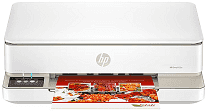
HP Envy 6165e Driver establishes communication between the computer and this all-in-one during installation. It also helps compatible systems recognize the printer through USB or wireless connections. Software applications can then send print, scan, and copy commands to the correct hardware functions. Selected paper, quality, color, and layout settings pass to the printer with each job.
HP Envy 6165e Drivers for Windows
3aad0e9a58b5c503702739326039990a8fe91f59eb83c28b30a068d69968bc20620068045902345004931235f980d18321eb73b2b9e83672a905b17b6e82367733a48d17157441a5f626bf8b2b5f85c04c1a524bacff1c548f899ad90978765ec11fe40d2b794ffeb0c9f87b6f22efe7b178646c583b58276f0dc4b24872778a83d239d64aa753b224ac1a5c229527fba7a264eb3653fb95af54a387b27b3b1bHP Envy 6165e Specifications
The HP Envy 6165e is a color all-in-one that uses HP Thermal Inkjet technology. It prints, scans, copies, and sends mobile faxes through the HP app on compatible mobile devices. Black and tri-color ink come from two cartridges. The scanner uses a flatbed that accepts one original at a time. Standalone controls appear on a 2.4-inch color capacitive touchscreen, and no automatic document feeder is fitted.
Black documents run at up to 10 ISO pages per minute, with color pages rated at 7 ppm. Printing from a computer can produce black output at up to 1200 × 1200 rendered dpi. On selected HP photo paper, optimized color resolution reaches 4800 × 1200 dpi. Borderless output extends to 8.5 × 12 inches. The scanner works at up to 1200 dpi optical resolution, and automatic duplexing turns sheets for two-sided printing.
The input tray takes up to 100 sheets, while printed pages collect in a 25-sheet output tray. Plain paper, photo paper, envelopes, cards, and brochure stock can pass through the same paper path. Automatic duplexing works with compatible document and photo jobs. Multipage originals require separate placement on the flatbed because the printer has no automatic document feeder. It also lacks a dedicated photo-paper tray.
A nearby computer can connect through Hi-Speed USB 2.0. Wireless communication uses dual-band Wi-Fi with 802.11a/b/g/n/ac compatibility. Mobile jobs can arrive through the HP app or Apple AirPrint, with Mopria services, Chrome OS, and the Android print plugin also supported. The monthly duty cycle is rated at up to 1,000 pages, and internal processing uses 256 MB of DDR3 memory. The body is approximately 17.07 inches wide, 5.35 inches high, and weighs about 11.28 pounds.
Technical Details
| Title | HP Envy 6165e Drivers |
|---|---|
| Device Type | All-in-one printer |
| Driver Version | Varies by driver and operating system |
| Available Downloads | Drivers |
| License | Free |
| Manufacturer | HP Inc. |