
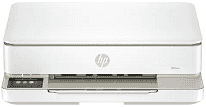
HP Envy 6155 Driver lets the computer send print settings and scan requests to the all-in-one printer. Setup software identifies the device on compatible Windows or macOS systems, whether it connects by USB or Wi-Fi. Copying runs from the printer itself, while scanning and printing can start through supported computer applications. Correct communication keeps document, photo, and page-layout settings intact before each job begins.
HP Envy 6155 Drivers for Windows
620068045902345004931235f980d18321eb73b2b9e83672a905b17b6e82367733a48d17157441a5f626bf8b2b5f85c04c1a524bacff1c548f899ad90978765ec11fe40d2b794ffeb0c9f87b6f22efe7b178646c583b58276f0dc4b24872778a83d239d64aa753b224ac1a5c229527fba7a264eb3653fb95af54a387b27b3b1b3aad0e9a58b5c503702739326039990a8fe91f59eb83c28b30a068d69968bc20HP Envy 6155 Specifications
The HP Envy 6155 uses HP Thermal Inkjet hardware for color printing. Its flatbed also scans and copies, and the HP app can send a mobile fax without a built-in fax modem. Ink comes from one pigment-black cartridge and a separate dye-based tri-color cartridge. Standalone controls appear on a 2.4-inch color touchscreen. Originals must be placed on the glass one at a time because no automatic document feeder is fitted.
Black documents print at up to 10 ISO pages per minute, with color output rated at 7 ppm. Black resolution reaches 1200 × 1200 rendered dpi. Selected photo paper permits optimized color output up to 4800 × 1200 dpi, although the final result also depends on the source image. The flatbed scans originals up to 8.5 × 11.7 inches at 1200 × 1200 dpi. Automatic duplexing handles two-sided print jobs, and borderless output extends to supported 8.5 × 12-inch media.
The input tray takes 100 plain sheets, but the output area holds only 25 printed pages. That smaller output capacity may require attention during longer jobs. Up to ten envelopes fit in the same tray. Photo, brochure, presentation, and coated inkjet papers can also be loaded there. Common sizes range from 3 × 5-inch photo sheets to Letter paper, with 4 × 12-inch sheets and No. 10 envelopes accepted. Automatic duplexing is limited to paper no larger than 8.5 × 11.7 inches.
A nearby computer can connect through Hi-Speed USB 2.0. Wireless jobs travel over dual-band Wi-Fi using compatible 802.11a/b/g/n/ac networks, and Wi-Fi Direct can link a device without the home router. Phones and tablets can print through the HP app, Apple AirPrint, Mopria, or the Android print plugin. Ethernet and Bluetooth hardware are absent. With the trays closed, the body measures 17.05 × 14.21 × 5.35 inches and weighs 11.28 pounds. HP rates the monthly duty cycle at 1,000 pages, although the recommended range is 100 to 400 pages.
Technical Details
| Title | HP Envy 6155 Drivers |
|---|---|
| Device Type | All-in-one printer |
| Driver Version | Varies by driver and operating system |
| Available Downloads | Drivers |
| License | Free |
| Manufacturer | HP Inc. |