
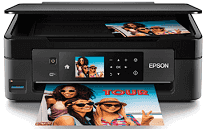
Epson XP-441 Driver carries print, scan, and copy commands between the computer and the all-in-one. Setup depends on a compatible Windows or macOS version and the correct connection method. A nearby computer can use USB, while wireless access lets supported devices send jobs over the network. The software then passes the selected page, image, and output settings to the printer.
Epson XP-441 Drivers for Windows
97dc10e112594056f08d7c11026e2a8e22c815d119dc609012cfe499fc5577e4ddfd6cac412b4a9544c2c403780fac091f1b2791e0070958c77407b1633b02c969d988d7d5a2f4c1649a9c360a9caa75d146dbfc725668d554a5a2540d619563Epson XP-441 Drivers for macOS
c6ed81c2e35fc7c80c2d957d7d6a29e4947b2a90dedd9948d986130541e2f86a56987ed89250906e1588deffa57f925fdac8d04d528f712d677a6e8473bb25b2d140086a5a373080658cb565e40d3e1c2df8946e94fc256089c69a12f763ff5d3dee4cd767cb069e2dbe84397f91aebd12061a2181f517a59a28efa52ed0b1e2d7ef45f2134d1502bd3c8a269ee5751e3d0d72b88deb88d8e3ec563422874d34Epson XP-441 Specifications
The Epson XP-441 combines inkjet printing with flatbed scanning and standalone copying. Its MicroPiezo printhead uses separate black, cyan, magenta, and yellow cartridges. A 2.7-inch color LCD and touch-sensitive controls manage local tasks, including photos opened from a memory card. Originals must be placed on the flatbed one at a time because no automatic document feeder is fitted. Faxing is not available.
Maximum print resolution reaches 5760 × 1440 optimized dpi. ISO speed is rated at 10 ppm for black pages and 4.5 ppm for color, with faster results possible in draft mode. Scanning relies on a color CIS flatbed with 1200 dpi optical resolution. Its hardware resolution extends to 1200 × 2400 dpi. Copy jobs can use standard or borderless settings and produce as many as 99 copies.
Paper loads from the rear, where the feeder holds up to 100 plain sheets or 10 envelopes. The output tray collects about 30 sheets, so it fills sooner than the input feeder empties. Standard choices range from A6 and photo paper to A4, Letter, and Legal sheets. Custom paper can reach 8.5 × 44 inches. Two-sided pages require manual turning because automatic duplex printing is absent.
A nearby computer can connect through Hi-Speed USB 2.0. Wireless jobs can travel over 802.11b/g/n Wi-Fi or directly through Wi-Fi Direct without using the home router. Mobile access covers Epson Connect, Epson iPrint, Email Print, AirPrint, and Google Cloud Print. During use, the body measures 39.0 × 52.8 × 27.9 cm and weighs about 4.3 kg. Power consumption is roughly 13 watts when copying, 4.6 watts when ready, and 1.6 watts in sleep mode.
Technical Details
| Title | Epson XP-441 Drivers |
|---|---|
| Device Type | All-in-one printer |
| Driver Version | Varies by driver and operating system |
| Available Downloads | Drivers |
| License | Free |
| Manufacturer | Seiko Epson Corporation |