
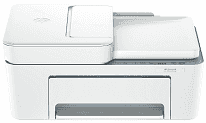
HP DeskJet Ink Advantage 4388 Driver lets Windows send print and scan commands to this colour all-in-one without confusing the device setup. The printer can print, scan, and copy, so the installed software needs to cover more than basic page output. A wired connection serves one nearby computer, while wireless setup lets jobs reach the printer over the local network. Once the driver is in place, scanned pages and everyday documents move between the computer and the printer with the correct device behavior.
HP DeskJet Ink Advantage 4388 Drivers for Windows
c8d2aa2725a82146f4cf0e31ad201cf8573cc64ed67fa905935e13958a525acb620068045902345004931235f980d18321eb73b2b9e83672a905b17b6e82367733a48d17157441a5f626bf8b2b5f85c04c1a524bacff1c548f899ad90978765ec11fe40d2b794ffeb0c9f87b6f22efe7b178646c583b58276f0dc4b24872778a83d239d64aa753b224ac1a5c229527fba7a264eb3653fb95af54a387b27b3b1bHP DeskJet Ink Advantage 4388 Specifications
HP DeskJet Ink Advantage 4388 is a colour inkjet all-in-one for printing, scanning, and copying. Fax hardware is not fitted. Printing comes from HP Thermal Inkjet technology using two HP 683 cartridges: black and tri-colour. A CIS flatbed takes single sheets, and the 35-sheet ADF feeds longer originals without placing each page by hand. An icon LCD provides basic controls rather than touchscreen menus.
Under ISO testing, black documents run at up to 8.5 ppm and colour pages at 5.5 ppm. Draft mode increases those figures to 20 ppm and 16 ppm on A4 or Letter paper. Black print quality reaches 1200 x 1200 rendered dpi. Selected HP photo paper permits colour output at up to 4800 x 1200 optimized dpi. The scanner captures at 1200 x 1200 hardware dpi, but copies print at 300 x 300 dpi.
The input tray takes 60 sheets, so it suits shorter home or small-office jobs better than long unattended runs. Printed pages collect in a 25-sheet output tray. Standard loading covers A4, B5, A6, and DL envelopes. Custom sheets can measure from 76 x 127 mm to 215 x 355 mm. Plain, photo, and brochure paper can use the same feed, which also accepts envelopes and compatible specialty inkjet stock. Borderless printing is unavailable, and double-sided pages must be turned manually when prompted by the driver.
A nearby computer can connect through Hi-Speed USB 2.0. Wireless jobs travel over dual-band 802.11a/b/g/n Wi-Fi on either 2.4 GHz or 5 GHz. Phones and tablets can print through the HP app, Apple AirPrint, Mopria Print Service, or the HP Print Service Plugin for Android. With the trays closed, the body measures 428 x 332 x 200 mm. Extending the output section increases its depth to 579 mm and its height to 261 mm. The printer weighs about 4.81 kg.
Technical Details
| Title | HP DeskJet Ink Advantage 4388 Drivers |
|---|---|
| Device Type | All-in-one printer |
| Driver Version | Varies by driver and operating system |
| Available Downloads | Drivers |
| License | Free |
| Manufacturer | HP Inc. |