
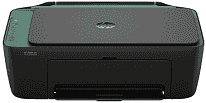
HP DeskJet Ink Advantage 2978 Driver lets Windows identify the all-in-one printer before print, scan, or copy commands are sent. After installation, the computer can pass jobs to the printer without treating it as an unknown device. A nearby computer can use USB for a direct setup. Wireless printing depends on the Wi-Fi connection chosen during setup, so the driver and printer must be on the same configured path. The same driver package also helps scanner communication, which matters when the flatbed is used for documents or photos.
HP DeskJet Ink Advantage 2978 Drivers for Windows
1bc30e7e1c545d9ac964bddb5c1c696303163e18b92d9a54de3fc09bdb7d47c5620068045902345004931235f980d18321eb73b2b9e83672a905b17b6e82367733a48d17157441a5f626bf8b2b5f85c04c1a524bacff1c548f899ad90978765ec11fe40d2b794ffeb0c9f87b6f22efe7b178646c583b58276f0dc4b24872778a83d239d64aa753b224ac1a5c229527fba7a264eb3653fb95af54a387b27b3b1bHP DeskJet Ink Advantage 2978 Specifications
HP DeskJet Ink Advantage 2978 is a compact colour inkjet all-in-one for printing, copying, and scanning. Fax hardware is not built into this machine. Printing comes from HP Thermal Inkjet hardware, fed by one black cartridge and one tri-colour cartridge. Inside the body, 64 MB DDR1 memory pairs with a 1.0 GHz processor. The small icon LCD gives basic status information rather than touchscreen control.
Black documents print at up to 7.5 ppm ISO. Colour pages move more slowly, reaching up to 5.5 ppm ISO. Draft mode raises speed to 20 ppm black and 16 ppm colour on A4 or letter paper, so it suits quick everyday pages better than quality output. Best black quality reaches 1200 x 1200 rendered dpi. For colour, 4800 x 1200 optimized dpi is possible on selected photo paper, and scanning relies on a CIS flatbed with 1200 dpi optical resolution.
Paper loads from a 60-sheet input tray, and printed pages collect in a 25-sheet output tray. That output capacity is smaller than the input side, so longer jobs may need attention before the tray fills. Standard sheets include A4, B5, and A6, with DL envelopes also accepted. Custom paper can run from 76 x 127 mm up to 215 x 355 mm. Plain, photo, brochure, envelope, and specialty inkjet paper can pass through the feed path, but borderless printing is not available.
A nearby computer can use the Hi-Speed USB 2.0 port. Wireless jobs can travel over dual-band Wi-Fi on 2.4 GHz or 5 GHz networks, using 802.11a/b/g/n. Direct printing from a phone works through the HP app, Apple AirPrint, Mopria, or the HP Print Service Plugin for Android. With the trays closed, the body measures 425 x 304 x 154 mm and weighs about 3.42 kg. Pulling out the output extension increases the depth to 546.6 mm during use.
Technical Details
| Title | HP DeskJet Ink Advantage 2978 Drivers |
|---|---|
| Device Type | All-in-one printer |
| Driver Version | Varies by driver and operating system |
| Available Downloads | Drivers |
| License | Free |
| Manufacturer | HP Inc. |