
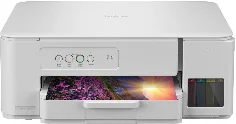
Brother DCP-T236 Driver helps the computer recognize this ink-tank multifunction printer during setup. After installation, the selected connection carries print, scan, and copy commands between the computer and the machine. Print settings and scan settings stay tied to the active job instead of being sent as unmatched commands. Scanned files can return to the computer once the flatbed scan is started through the supported software.
Brother DCP-T236 Drivers for Windows
319132d87b5e6f73fb29d66f88d739c44a636adbc8ca6b78764264c311efcaa82e77eb5e59f5e6e88af9308da54976c037e98c902e6f14a6e820dc14fb2ee1672e77eb5e59f5e6e88af9308da54976c037e98c902e6f14a6e820dc14fb2ee1670edce9170c3f46f065e52aa6335c093befa453212698a94c7d59fcfc5197fa7e71169ef33cab91b5dc1e848ff483c40ad2eec7be44e69fcb0c084a590a79b49eBrother DCP-T236 Drivers for Linux
00cf59fcbcdb1c9387265d9baabcefc454926d7c24dfc1c4f7c7117ff202c0a072a0e6e0c9722c27977feb49383233ec69bf26fd4941f1b8e33d95320c4197549c3a200db3dc7b2b3332dff8c5226b4f3ee560d20b2e1f4918b1faf7124517b2197f63a52e89b8744f5a3c2d843abb3b76d003d5d4830bdfe675c44841a6c72bcda25534ea8e3018e7d46b970cb08b36084355adedc933aba0c8c7d03e903db901dc859f1978e645147ced5ec4b5448cc3e26b1c6d2f1104834f5891c0e17469d724746540a51f8286f2a318b47657227f7131d384a1a4f0475dacb7e3580f3ee74ef3a5529ebf3b26d6139ce15d75374a4538ba2efd48c28b209b0d705e5ec72ba3bffcf199fee6387cb79d6923214648db0f2df1c5a13f8f8f0a6fe0995c401404f2622e60470b4de25d0cdb4adc0f130ace6b380cc0d4b3d7714ad761c1ae82aa17ba2e331de1fcb34f0a839d27b9b193ac680d9742250a89e588a6bd56206c4e17c6dbcf263d9d08fb460ccd5b9f1a23fce79b30d0a41d96a224839322b2Brother DCP-T236 Specifications
Brother DCP-T236 is an inkjet ink-tank multifunction printer for printing, scanning, and copying. Printing comes from a piezo print head with 210 mono nozzles and 70 nozzles for each colour channel. Inside the body, 64 MB of memory works with button operation and status LEDs instead of a touchscreen. Separate refill tanks hold black, cyan, magenta, and yellow ink for each colour.
Print resolution reaches up to 1200 × 6000 dpi from Windows when best mode uses glossy photo paper. The flatbed scans originals up to 215.9 × 297 mm, while optical scan resolution reaches 1200 × 2400 dpi. Through TWAIN, interpolation can reach 19200 × 19200 dpi. Copying prints at up to 1200 × 1800 dpi, with scaling from 25% to 400% and stacks up to 99 pages.
Paper input comes through a 150-sheet front tray, while the manual feed slot accepts single sheets. Plain, inkjet, glossy, and recycled paper can pass through both paths. Sizes include A4, Letter, 16K, Executive, B5, A5, B6, A6, envelopes, photo sheets, and index cards. Printed pages collect in a 50-sheet output area for 80 gsm plain paper. Borderless output covers A4, Letter, A6, Photo, Photo L, Photo 2L, and index cards.
Connectivity stays wired through Hi-Speed USB 2.0, using a Type A/B cable no longer than 2 m. Wireless LAN, Ethernet, and fax hardware sit outside this model, so network printing needs a host computer. The body weighs 6.3 kg, while power use sits around 13 W copying, 2.0 W ready, 0.6 W sleep, and 0.15 W off during scanning or copying.
Technical Details
| Title | Brother DCP-T236 Drivers |
|---|---|
| Device Type | All-in-one printer |
| Driver Version | Varies by driver and operating system |
| Available Downloads | Drivers |
| License | Free |
| Manufacturer | Brother Industries, Ltd. |