
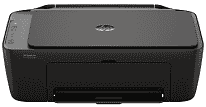
HP DeskJet Ink Advantage 2976 Driver lets the computer recognize the printer and send jobs to it correctly. The same software link carries scan data back from the flatbed after setup. Copies start from the control panel, so that function does not depend on an attached computer. Proper recognition also keeps the selected print and scan settings tied to the correct device.
HP DeskJet Ink Advantage 2976 Drivers for Windows
1bc30e7e1c545d9ac964bddb5c1c696303163e18b92d9a54de3fc09bdb7d47c5620068045902345004931235f980d18321eb73b2b9e83672a905b17b6e82367733a48d17157441a5f626bf8b2b5f85c04c1a524bacff1c548f899ad90978765ec11fe40d2b794ffeb0c9f87b6f22efe7b178646c583b58276f0dc4b24872778a83d239d64aa753b224ac1a5c229527fba7a264eb3653fb95af54a387b27b3b1bHP DeskJet Ink Advantage 2976 Specifications
HP DeskJet Ink Advantage 2976 is a thermal inkjet all-in-one that prints, scans, and copies. Black and tri-color ink come from two cartridges, with HP 654 supplies made for this regional version. Scanning relies on a CIS flatbed. Each original must therefore be placed on the glass by hand because no document feeder is fitted. An icon LCD and physical buttons provide local control, and the machine has no fax hardware.
Everyday black documents reach 7.5 ISO ppm, with color pages rated at 5.5 ISO ppm. Draft mode is quicker at up to 20 ppm in black and 16 ppm in color, although it uses lower print quality. A first black page takes about 16 seconds, and color takes roughly 20 seconds. Black resolution reaches 1200 × 1200 rendered dpi. Color output can rise to 4800 × 1200 optimized dpi, and the flatbed scans at up to 1200 × 1200 dpi.
Paper enters through a 60-sheet input tray, but the output tray holds only 25 sheets. Longer jobs may therefore need pages removed before the input tray empties. A4, B5, and A6 sheets fit, as do DL envelopes. Custom paper can measure from 76 × 127 mm to 215 × 355 mm. Plain and photo stock share the same feed with brochure paper, envelopes, and other inkjet media. Two-sided pages require manual turning, and borderless photo printing is unavailable.
A nearby computer can connect through Hi-Speed USB 2.0. Wireless jobs travel over 2.4 GHz or 5 GHz Wi-Fi, so the printer can join either band on a compatible router. Phones and tablets can print through the HP app, Apple AirPrint, Mopria Print Service, or the Android print plugin. With its trays closed, the body measures 425 × 304 × 154 mm. Opening the output extension increases the depth to 546.6 mm and the height to 250 mm. The machine weighs 3.42 kg and carries a monthly duty-cycle rating of up to 1,000 pages.
Technical Details
| Title | HP DeskJet Ink Advantage 2976 Drivers |
|---|---|
| Device Type | All-in-one printer |
| Driver Version | Varies by driver and operating system |
| Available Downloads | Drivers |
| License | Free |
| Manufacturer | HP Inc. |