
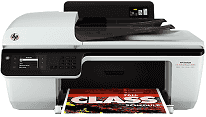
The typical family of Deskjet ink advantage printers has outstanding features for both private and commercial printing processes. The printer also has two basic connectivity options, which are the USB 2.0 hi-speed port and the fax connector. Also, it has a height of 9.3 inches, a width of 21.3 inches, and a depth of 17.5 inches. However, the weight of this device is about 11.9 lbs, which is equivalent to 5.4 kg. When the HP Deskjet Ink Advantage 2640 printer model is used, the internal driver helps with manual duplex printing.
HP Deskjet Ink Advantage 2640 Drivers for Windows
2301b45b87ef3ce3b4b999f2a1f426f4dc2554083f73e5968adb487544cb294d7aafacf06cdc96afecd8e0efaef8685b3184038499bf17f8759b3f1bc09947cdd09a673aee2ad01696d4c225ec39d8172651940ad2501a6537ba7bf074784fa9HP Deskjet Ink Advantage 2640 Drivers for macOS
99e1d18847c64a405486ae34424f0a1c8d89920d17df86c45b6b0007f101d70a466252757c12dc5bb29d187827281122fcc64d2eebe7d54a1f095ff153f1822cThe compatible cartridges depend on the regions of the world where the printer is in use. In Latin America, the compatible cartridge model is the HP 662, one for black and the other for color printing. For Asia, the HP 678 cartridge is applicable while Europe, the Middle East, and Africa use the HP 650 black and color cartridges. Compatible paper types include plain, envelopes, transparencies, index cards, and envelopes.
The main input tray of the HP Deskjet Ink Advantage 2640 printer can accommodate up to 60 sheets of plain paper. Also, the same tray can take up to 20 sheets of transparencies or photo paper and five envelopes. On the other hand, the output tray takes 25 sheets of plain paper, 20 sheets of photo paper, and five envelopes.
The HP Deskjet Ink Advantage 2640 printer runs the sharp drop on demand thermal inkjet technology. This method helps to maximize the printing resources, together with the PCL3 GUI or enhanced print language. The speed of the printer also depends on the complexity of the document in print. The copy specifications include a digital image processing feature with varying rates according to the printer model.
The resolution of this printer is about 300 x 300 dots per inch (dpi) at a minimum when in draft mode. Other modes such as the standard, plain best, and photo best modes have resolutions up to 600 x 600 dpi at maximum.
Technical Details
| Title | HP Deskjet Ink Advantage 2640 Drivers |
|---|---|
| Device Type | All-in-one printer |
| Driver Version | Varies by driver and operating system |
| Available Downloads | Drivers |
| License | Free |
| Manufacturer | HP Inc. |