
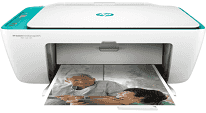
In the class of all-in-one HP printers, one is the HP DeskJet Ink Advantage 2675 with the V1N02A product number. It connects to the system through the standard Universal Serial Bus (USB) 2.0 hi-speed port and wireless connection. Also, the printer has a width of 16.73 inches, a depth of 21.56 inches and a height of 9.79 inches. These dimensions consider the input and output tray extension already in place. Besides, the weight of the machine is about 3.42 kg, which is the same thing as 7.55 lbs by US standard.
HP DeskJet Ink Advantage 2675 Drivers for Windows
0359aa3ada42d0eaf28c70ea49cda62c0fd270bf8c3e688ace5fe6598b61a56961c5240497b90824b3ca682a2cf55784a9c649e0563c7b660e965b693e7d22c0b23d406f9ead127ab9c16d45b0e9ac9474ba07ff85fe7d3a8ad8de02e9a6ac0a373a276ebf900f415614f95049074925c9a5cd92d1806b5c341144a3e3d61b7c7357b049aa5c1854ae12e7cb0b9a52f77139a66c3382fa303a91296c4b4ee070f50dad657f400372a066f31d5596db54ad4d289fdcdaf11f1209f7c83f8ebfaef50dad657f400372a066f31d5596db54ad4d289fdcdaf11f1209f7c83f8ebfaef50dad657f400372a066f31d5596db54ad4d289fdcdaf11f1209f7c83f8ebfaeHP DeskJet Ink Advantage 2675 Drivers for macOS
99e1d18847c64a405486ae34424f0a1c8d89920d17df86c45b6b0007f101d70aThe HP DeskJet Ink Advantage 2675 printer input tray capacity is up to 60 sheets of plain paper with 20 index cards and five envelopes. On the other hand, the output tray can as well hold up to 25 sheets of printed pages in basic sizes. Also, the supported media sizes are A4, B5, A6, letter, legal, photo frames, and DL envelopes. In terms of the primary paper types, this printer supports plain, photo, brochure, or professional matte papers. The acceptable media weight on the average is about 75 gsm, which is equal to about 20 lbs.
The printer uses a contact image sensor (CIS) scanning technology that can capture documents in detail. Also, users can enjoy a resolution of 1200 x 1200 dpi with 256 levels of grayscale depth. The power component supports an internal power supply within the range of 100 to 240 volts AC. The printer also supports the use of two types of cartridges, one for black and the other for tri-color printing.
Printing with this machine runs by the new HP thermal inkjet print technology which is inherently conservative on print resources. Also, this particular ink advantage model can adequately optimize the use of ink for best print quality. The machine has manual duplex printing with the aid of a driver while the average speed is 20 ppm. This speed applies to printing in black and white and in the draft mode. However, printing in color in the same mode is at the rate of 16 ppm.
Technical Details
| Title | HP DeskJet Ink Advantage 2675 Drivers |
|---|---|
| Device Type | All-in-one printer |
| Driver Version | Varies by driver and operating system |
| Available Downloads | Drivers |
| License | Free |
| Manufacturer | HP Inc. |