
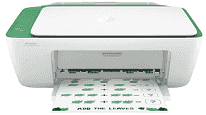
HP DeskJet Ink Advantage 2337 Driver helps Windows recognize the printer, scanner, and copier functions during USB setup. The printer uses a wired USB connection, so the computer must detect the device before print or scan commands can pass correctly. Scanning and copying depend on the same all-in-one hardware, with originals placed on the flatbed one at a time. After setup, the driver keeps paper settings, print commands, and scan requests matched to the connected HP device.
HP DeskJet Ink Advantage 2337 Drivers for Windows
8971e932523e862607c3b7c1946cb1ecc37aa642ab891e4634d03e617933b43883d239d64aa753b224ac1a5c229527fba7a264eb3653fb95af54a387b27b3b1b83d239d64aa753b224ac1a5c229527fba7a264eb3653fb95af54a387b27b3b1b83d239d64aa753b224ac1a5c229527fba7a264eb3653fb95af54a387b27b3b1bHP DeskJet Ink Advantage 2337 Drivers for macOS
11b4e7e6f8d6fc2b3ecd4eb9d40b56d259203ed7f48a12b51a85ca68be4d44f7HP DeskJet Ink Advantage 2337 Specifications
HP DeskJet Ink Advantage 2337 is a compact colour inkjet all-in-one for print, scan, and copy jobs. Fax hardware is not fitted. Printing uses HP Thermal Inkjet technology with two cartridges: one black and one tri-colour. In APJ regions, the replacement cartridges are HP 682 black and HP 682 tri-colour. The front panel stays simple, with buttons instead of a display screen.
Black documents can print at up to 1200 x 1200 rendered dpi. Colour output reaches up to 4800 x 1200 optimized dpi, but only on selected HP photo paper. ISO speed is listed at up to 7.5 ppm black and 5.5 ppm colour. Draft mode moves faster on A4, reaching 20 ppm black and 16 ppm colour. Scanning relies on a CIS flatbed with up to 1200 x 1200 dpi hardware resolution, so each original is placed on the glass by hand. Copy output reaches 600 x 300 dpi.
Paper loads through a 60-sheet input tray, which suits light home use better than long unattended runs. Printed pages collect in a smaller output tray rated for up to 25 sheets. Plain paper, photo paper, and brochure paper can be used. Common document sizes include A4, B5, A6, Letter, and Legal. Smaller photo sheets such as 4 x 6 in, 5 x 7 in, and 8 x 10 in also fit, along with DL envelopes. Borderless printing is not available. For two-sided documents, the driver can guide duplex printing, but the pages still need to be turned manually.
A nearby computer connects through the Hi-Speed USB 2.0 port. Wireless hardware is absent, so there is no built-in Wi-Fi or Ethernet. Mobile printing and storage-device printing are not part of this model either. The monthly duty cycle is up to 1000 A4 pages, although HP recommends 50 to 100 pages for regular use. Ready mode draws 1.83 watts. With the trays closed, the body measures 425.2 x 304.1 x 149.1 mm and weighs 3.42 kg.
Technical Details
| Title | HP DeskJet Ink Advantage 2337 Drivers |
|---|---|
| Device Type | All-in-one printer |
| Driver Version | Varies by driver and operating system |
| Available Downloads | Drivers |
| License | Free |
| Manufacturer | HP Inc. |