
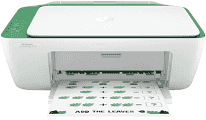
If you chose the HP DeskJet Ink Advantage 2375 model among the Deskjet HP printers, you made a great choice. However, the package contains the machine and an HP 682 Setup black cartridge, and a tri-color cartridge. Other items are the regulatory flier, setup guide, reference guide, and a power cord (not longer than 1.5 m). HP DeskJet Ink Advantage 2375 has a fixed driver that works for manual duplex printing under ideal conditions.
HP DeskJet Ink Advantage 2375 Drivers for Windows
8971e932523e862607c3b7c1946cb1ecc37aa642ab891e4634d03e617933b4382f92fdda886ff61322267491d919546ee90c5c8a688eaf9d89f24a8cde5b5c842f92fdda886ff61322267491d919546ee90c5c8a688eaf9d89f24a8cde5b5c842f92fdda886ff61322267491d919546ee90c5c8a688eaf9d89f24a8cde5b5c84HP DeskJet Ink Advantage 2375 Drivers for macOS
99e1d18847c64a405486ae34424f0a1c8d89920d17df86c45b6b0007f101d70aHP DeskJet Ink Advantage 2375 Specifications
The machine has a hi-speed USB 2.0 port without support for any external storage device in terms of connectivity. Copying with the device can produce up to 9 copies from one original document. It can also work with both monochrome and color documents. Its copy resolution is about 600 x 300 dots per inch (dpi). The acoustic pressure emission is about 48 dB(A), and the acoustic power emission is 6.2 B(A) during active printing.
The recommended operating humidity ranges between 20 and 80% with no condensation. At the same time, the non-operating humidity range is between 5 and 90% without condensation. Concerning the temperature range, the operation requires a range between 15 and 30°C. However, when the machine is in storage, the acceptable temperature is between -40 and 60°C. This machine also comes with integrated memory for optimum performance.
The input paper tray of the device can hold up to 60 sheets of plain paper with 20 index cards. It also takes five envelopes, while the output tray only accommodates 25 sheets during output. By physical measurement, this device has a height of 249 mm, a depth of 523.8 mm, and a width of 425 mm. Its net weight is also not more than 3.42 kg, equivalent to 7.55 lbs. As an energy-saving feature, the machine has an HP auto-off technology.
Technical Details
| Title | HP DeskJet Ink Advantage 2375 Drivers |
|---|---|
| Device Type | All-in-one printer |
| Driver Version | Varies by driver and operating system |
| Available Downloads | Drivers |
| License | Free |
| Manufacturer | HP Inc. |