
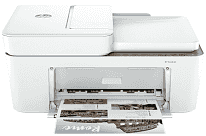
HP DeskJet 4258e Driver lets the computer communicate correctly with this all-in-one printer. After setup, Windows or macOS can send print jobs and detect the scanner for basic scan work. Copying runs from the printer itself, but the software still helps the computer recognize the device correctly. A USB cable suits a nearby computer, while wireless setup keeps the printer available on the home network.
HP DeskJet 4258e Drivers for Windows
d139a05476eee498e57d9dc4137e1b5919e33c91163ba39f96d4cfcd3205d698620068045902345004931235f980d18321eb73b2b9e83672a905b17b6e82367733a48d17157441a5f626bf8b2b5f85c04c1a524bacff1c548f899ad90978765ec11fe40d2b794ffeb0c9f87b6f22efe7b178646c583b58276f0dc4b24872778a83d239d64aa753b224ac1a5c229527fba7a264eb3653fb95af54a387b27b3b1bHP DeskJet 4258e Specifications
HP DeskJet 4258e is a color HP Thermal Inkjet all-in-one, so the same body prints, scans, and copies. Ink comes from two cartridges. The black cartridge uses pigment ink, and the tri-color cartridge uses dye-based color ink. Scanning can use the flatbed for single originals or the 35-sheet automatic document feeder for a small stack. On the front, an LCD icon display shows basic status and copy settings.
Black document speed reaches up to 8.5 ppm under ISO measurement. Color pages run slower, at up to 5.5 ppm. From a computer, black print resolution can reach 1200 x 1200 rendered dpi. Color output rises to 4800 x 1200 optimized dpi only on selected HP photo paper. The scanner works at up to 1200 dpi optical resolution, and copies are limited to 300 x 300 dpi. Standalone copying stops at 9 copies per job.
Paper loads through a 60-sheet input tray, which is modest even for an all-in-one with an ADF. Finished pages collect in a 25-sheet output tray. Letter, Legal, 4 x 6-inch, 5 x 7-inch, and 8 x 10-inch paper sizes fit the feed path. No. 10 envelopes also fit, but only up to 5 at a time. Custom paper can range from 3 x 5 inches to 8.5 x 14 inches. Borderless printing is not available, and two-sided pages need manual duplexing from the driver.
A computer can connect through the Hi-Speed USB 2.0 device port. Wireless jobs move over Wi-Fi 802.11b/g/n, with no Ethernet port listed for this model. Phones and Chromebooks can print through Apple AirPrint, Chrome OS, Mopria, or the HP app. With the trays closed, the body measures 16.85 x 13.07 x 7.87 inches. Opening the output extension increases the footprint to 16.8 x 22.8 x 10.3 inches, so the printer needs extra desk depth during use. Weight is 10.6 lb.
Technical Details
| Title | HP DeskJet 4258e Drivers |
|---|---|
| Device Type | All-in-one printer |
| Driver Version | Varies by driver and operating system |
| Available Downloads | Drivers |
| License | Free |
| Manufacturer | HP Inc. |