
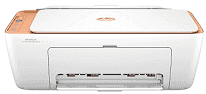
HP DeskJet 2800e Driver helps the computer set up a clear device path for this all-in-one printer. After installation, print jobs can reach the printer, and the same connection also lets the computer use the scan and copy controls. Scanning still depends on the printer hardware, not the driver alone. When the driver matches the device, everyday documents and images move between the computer and printer with fewer setup errors.
HP DeskJet 2800e Drivers for Windows
55c932f7d688422e170ad192603f6e581363a1ba9ad0ab99a852f1a5c1a4ef51620068045902345004931235f980d18321eb73b2b9e83672a905b17b6e82367733a48d17157441a5f626bf8b2b5f85c04c1a524bacff1c548f899ad90978765ec11fe40d2b794ffeb0c9f87b6f22efe7b178646c583b58276f0dc4b24872778a83d239d64aa753b224ac1a5c229527fba7a264eb3653fb95af54a387b27b3b1bHP DeskJet 2800e Specifications
The HP DeskJet 2800e is a compact colour thermal inkjet all-in-one for printing, scanning, and copying. Ink comes from two cartridges: black in one slot, cyan, magenta, and yellow in the tri-colour cartridge. The flatbed sits under the lid for single originals. Local control stays simple, with an icon LCD and physical buttons instead of a touchscreen or automatic document feeder.
Black text reaches up to 7.5 ISO pages per minute, so this is not built for heavy document batches. Colour printing runs slower at up to 5.5 ISO pages per minute. Best black output reaches 1200 x 1200 rendered dpi. On photo paper, colour quality can rise to 4800 x 1200 optimized dpi, but borderless printing is not available. The scanner captures up to 1200 dpi across a 216 x 297 mm area, and copy jobs stop at 300 x 300 dpi with as many as nine copies.
Paper loads from the rear, not from a front cassette. The tray takes up to 60 plain sheets, which suits short home jobs better than unattended stacks. Photo paper drops that capacity to 20 sheets, and envelopes load five at a time. A4, B5, A6, and DL envelope sizes fit through the same feed. Printed pages land in a 25-sheet output tray. For two-sided documents, each sheet has to be turned manually because automatic duplex printing is not built in.
Wireless jobs use 2.4 GHz Wi-Fi. Wi-Fi Direct can make a direct link when a router connection is not being used. A nearby computer can connect through Hi-Speed USB 2.0, but wired networking ends there because Ethernet is absent. With the trays closed, the body measures 425 x 304 x 154 mm and weighs about 3.42 kg. Pulling out the output hardware increases the maximum depth to 546 mm and the height to 250 mm.
Technical Details
| Title | HP DeskJet 2800e Drivers |
|---|---|
| Device Type | All-in-one printer |
| Driver Version | Varies by driver and operating system |
| Available Downloads | Drivers |
| License | Free |
| Manufacturer | HP Inc. |