
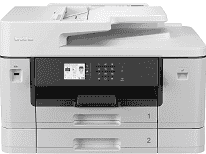
Brother MFC-J6740DW Driver lets the computer identify this multifunction inkjet correctly before print, scan, copy, or fax jobs are sent. Proper recognition matters most when the machine is used for more than basic printing, because scan data and fax commands need the right software path. A local setup can use USB, while network use can run through Ethernet or the wireless connection. After installation, supported programs can send pages to the printer and receive scans back from the selected device.
Brother MFC-J6740DW Drivers for Windows
1a49ac52b7a570e189cea33672d1ef66b3740a177477fb883a4d8b00bdb16a9b76ddc3d3ac00c5aeb5f775581dd2d992d55d4406acb173225462f73ae3dcbd7976ddc3d3ac00c5aeb5f775581dd2d992d55d4406acb173225462f73ae3dcbd790edce9170c3f46f065e52aa6335c093befa453212698a94c7d59fcfc5197fa7ec3db3f10657ece97a5dbae2b5490dd24b3691426d6add2c17e1cc1c2fc8b609d71169ef33cab91b5dc1e848ff483c40ad2eec7be44e69fcb0c084a590a79b49eBrother MFC-J6740DW Drivers for macOS
5d09788e98b2c9e91b297e4245f410a6e990743dddec3a740d0cf6a3735ae782Brother MFC-J6740DW Drivers for Linux
db8fd8c20e0860705631d62f45bdb732cf8ca47e95468a0ff3410ebb8c24cf4e7dddb1125f26d68c2ce8af892a01115258020ce2e2b9fd36afbd5a5efa26c7d69c3a200db3dc7b2b3332dff8c5226b4f3ee560d20b2e1f4918b1faf7124517b2197f63a52e89b8744f5a3c2d843abb3b76d003d5d4830bdfe675c44841a6c72bcda25534ea8e3018e7d46b970cb08b36084355adedc933aba0c8c7d03e903db901dc859f1978e645147ced5ec4b5448cc3e26b1c6d2f1104834f5891c0e17469d724746540a51f8286f2a318b47657227f7131d384a1a4f0475dacb7e3580f3ee74ef3a5529ebf3b26d6139ce15d75374a4538ba2efd48c28b209b0d705e5ec72ba3bffcf199fee6387cb79d6923214648db0f2df1c5a13f8f8f0a6fe0995c401404f2622e60470b4de25d0cdb4adc0f130ace6b380cc0d4b3d7714ad761c1aee28a8765f6637456d81ad1a56226e6857be2f1581fdcd9e4a5a4fbc4c42dd3450a4412b306b9ce2eb7e3ef4734a7b648f9561f525922b02541e98b545929dc2b82aa17ba2e331de1fcb34f0a839d27b9b193ac680d9742250a89e588a6bd56206c4e17c6dbcf263d9d08fb460ccd5b9f1a23fce79b30d0a41d96a224839322b2Brother MFC-J6740DW Specifications
Brother MFC-J6740DW is an A3 inkjet multi-function printer with print, scan, copy, and fax hardware in the same chassis. Control runs from a 6.8 cm colour touchscreen, backed by 256 MB of memory. The scanner uses a CIS sensor under the flatbed glass, with a 50-sheet automatic document feeder above it for multi-page originals. Four separate ink cartridges sit inside the print system, and the body also has USB host access, fax memory, and automatic duplex printing.
A4 printing reaches 28 ppm in mono or colour. Two-sided output is slower, at 22 ppm, because the duplex path has to turn each sheet. The first page comes out in 4.4 seconds for mono jobs and 4.6 seconds for colour jobs. Print resolution reaches 1200 x 4800 dpi. From the glass, scan resolution rises to 1200 x 2400 dpi in mono, while ADF scanning drops to 600 x 600 dpi for mono originals and 300 x 600 dpi for colour.
Paper loading uses two 250-sheet trays, so the machine can keep more than one paper size ready. A single-sheet manual feed slot remains available for odd media or one-off jobs. Both main trays take A3, Ledger, Legal, Folio, A4, and Letter sheets, although the lower tray is restricted to plain and recycled paper. Finished A4 or Letter pages stack up to 100 sheets. For A3 output, the tray holds up to 50 sheets, and envelopes feed from the standard tray or the manual slot.
A nearby computer can use Hi-Speed USB 2.0. Networked offices can use 10Base-T/100Base-TX Ethernet, or send jobs over 2.4 GHz and 5 GHz wireless networking. Wi-Fi Direct gives another route when a device needs to print without joining the main router. Phone and tablet printing works through Brother Mobile Connect, Apple AirPrint, Mopria, and the Brother Print Service Plugin. With the carton removed, the unit measures 575 x 477 x 374.5 mm and weighs 23.0 kg, and Brother rates typical monthly use at 250 to 2,500 pages.
Technical Details
| Title | Brother MFC-J6740DW Drivers |
|---|---|
| Device Type | All-in-one printer |
| Driver Version | Varies by driver and operating system |
| Available Downloads | Drivers |
| License | Free |
| Manufacturer | Brother Industries, Ltd. |