
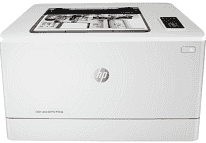
The model, the HP Color LaserJet Pro M154a printer sets an example for laserjet printers with exceptional properties. The unique product number for the device is T6B51A while it uses four different cartridges. The contents of the printer package include an introductory HP LaserJet color cartridge that can print up to 700 pages. The cartridge can handle composite cyan, magenta, and yellow colors while the black cartridge can produce 800 pages yield.
HP Color LaserJet Pro M154a Drivers for Windows
f49138c95791d12cbd3d205bb0d1312f89d148ad6c920a62a0d7e011af56c9f3d826d0e0c63a3612bda913a606fba3aae7265ced0e00d4014841bcfca8897d20fa11a723ff95c9064398fa7ea92ddf243e250a0cf72f7f06eca68821315b87c6eb727293767ac87183406c24c35cea7756c5b4acbcd130e968e6f166c6c95c08bea1ab4fb7079681cb60e7dcc19ffdcaa8f955a7b4c018f4b44c5ff05cf20973b5e03eff7772b8ff14e6bc09e7d3ece79fdc058ac93e597d4de58ea65cd131a1680967e8c32026bc2071ce27a65e55a2e26501f405a8a09c0324f59a974f1cc2252e3bb84737038c907650b13a150fe34cfaddc5810fa8a17e29b0e1e3e49fed9086a918c0d2b80dc034ad79fe64f90fc0fb244fb9ed7af2c3c9e71cf03979831088425bc237bfabaf7ff8fedb6675d2bc6a55836caa899688eda82c404247313e1529cc2cf7f249d20d574f41e6d32f7e9ce1341e11553bec91c6fa19a34663f50dad657f400372a066f31d5596db54ad4d289fdcdaf11f1209f7c83f8ebfaef50dad657f400372a066f31d5596db54ad4d289fdcdaf11f1209f7c83f8ebfaef50dad657f400372a066f31d5596db54ad4d289fdcdaf11f1209f7c83f8ebfaeHP Color LaserJet Pro M154a Drivers for macOS
99e1d18847c64a405486ae34424f0a1c8d89920d17df86c45b6b0007f101d70aHP Color LaserJet Pro M154a Drivers for Linux
380632d05031b00d8219e30901b26ac0a0ec0e71c160a29fcd08f232d940f968HP Color LaserJet Pro M154a printer Replacing Cartridges
Black LaserJet Toner HP 204A Cartridge (~1100 yield)
Cyan LaserJet Toner HP 204A Cartridge (~900 yield)
Yellow LaserJet Toner HP 204A Cartridge (~900 yield)
Magenta LaserJet Toner HP 204A Cartridge (~900 yield)
Black LaserJet Toner HP 205A Cartridge (~1100 yield)
Cyan LaserJet Toner HP 205A Cartridge (~900 yield)
Yellow LaserJet Toner HP 205A Cartridge (~900 yield)
Magenta LaserJet Toner HP 205A Cartridge (~900 yield)
Specifications
The package also contains an installation guide, printer documentation, software on CD-ROM, a power cord and USB cable. The main connectivity port of the printer is through the full speed USB 2.0 channel. The acoustic power emission reaches 6.2 B(A) for both color and monochrome printings. At the same time, HP Color LaserJet Pro M154a printer allows a humidity range between 30 and 70%. On the other hand, the non-operating humidity is between 0 and 95% without condensation.
The recommended operating temperature range is between 17 and 250C, but for storage, it is between -20 and 400C. The environmental specifications also include a mercury-free concept. The internal memory of the HP Color LaserJet Pro M154a machine is up to 128MB of DDR and at the maximum range for NAND Flash. The input capacity is up to the field of 250 sheets through the main input tray at 25mm stack height. Similarly, the same tray can take up to 5 envelopes and reaching 15 mm stack height.
On the other hand, the output capacity of the printer reaches 100 sheets of printed paper at 10mm stack height. The compatible media sizes include letter, legal, executive, and various media types. The recommended media types include a bond, brochure, colored, glossy, heavy, and letterhead types. Similarly recommended the weight of the printer is between 60 and 163 gsm by metric measurements. In the same way, the dimensions of the printer involve a height of 244.2 mm and a depth of 435 mm. The width of the device is about 392 mm, with a weight of 13.3 kg, which is equivalent to 29.3 lbs.
Technical Details
| Title | HP Color LaserJet Pro M154a Drivers |
|---|---|
| Device Type | Printer |
| Driver Version | Varies by driver and operating system |
| Available Downloads | Drivers |
| License | Free |
| Manufacturer | HP Inc. |