
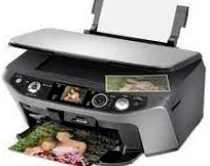
The Epson Stylus Photo RX580 printer model uses print-on-demand inkjet technologies and six individual cartridges. The examples include black, cyan, yellow, magenta, light cyan, and light magenta. Besides, Epson Stylus Photo RX580 has an internal driver capable of duplex printing with compatibility with different OS versions. It can also print, scan, and copy as a multipurpose device. The mechanical part works by friction with a sheet feeder and a top entry.
This package contains the following items:
- Printer Driver
- Scanner Driver
- Epson Status Monitor
- EasyPrint
- Epson Print CD
Epson Stylus Photo RX580 Drivers for Windows
75eca16566b8dfc370f9848d10af72795d959f4d22856c2efb4a1a3bdb8cd98d1454b744bc4e42aeb4b8b8e4de0637401c9866bee8bace1fed71e04aaf41f6c528c0b75738038163368aab8776b9ee50101d8f29b495a57a08d990e5ee372dd1b6158e9695244805d136a6ed592f48979bb521e5bfa1a5f6666b6040857117c27d7cb1f6dcd3c0ca93e9313cd9ba5b529e588f9623a1e73ae7706eda5c8b030e0a17a36d85ef5b30e3ee9a7c630e569ab006bf3ee8325186cee500e5771d62f31d9d5cec8a625187c2b0e72c18f488ae57a870be8c2c02286803cc39906927b04411406dde7d1a6db37c4a127172457efba1369695d2362899251420519cfaa8bd2ce6e5c2d4238d3ba3f3172e9324c8b6876d1377053bdb9820c5fdca308347f1fb5c22d32ee83957bce672e9335b8d1440da227d7acdb85593b8f717581c40d80b4046076303f0f660a5d95a1dee5ee065916f3a3bb3b21581d4b2ba706bb0d31e64306dc893f54fb997135f9ccbc51dbd4193cde6328662a9cc3f6bab737800c776f9b9e9ae21196cfa98418859336fba0a129551cf51cbe9179f4e0b9602225bbcec4cae5420b505355cb11d50f1275b15baf8123566f2e6abc588511673Epson Stylus Photo RX580 Drivers for macOS
68cfd090f10b8281e0a818796048fd59e356fa04b3656d46a95e7c9e619ebd1e4e1c7f21a99add32283988c713f7cdb049c587d9570bc02b25f16c5b0a677667862e882ea954dd80c9196dbcbf47642c6ac0309b3dcb5bc7d8a91d79b353048d3dee4cd767cb069e2dbe84397f91aebd12061a2181f517a59a28efa52ed0b1e24df4ca8a14e939e4509f04a17bc89c24f18c20d8d5d81cc6f7668baa02a9250ccf50d93120ff7fecfaffac818157b983c9397bdfce8c85176f36cfa8862be2bcEpson Stylus Photo RX580 Specifications
This machine also has an input tray that can accommodate up to 120 sheets of plain paper. At the same time, the physical storage dimensions of the Epson Stylus Photo RX580 printer include a width of 17.7 inches, a depth of 16.3 inches, and a height of 8.3 inches. It also has an average weight of 8.3 kg, equivalent to 18.3 lbs without the ink cartridges. Scanning has a flatbed color component with a color image scanner (CIS) element as the photoelectric device. Besides, the effective pixels work with 10,200 x 14040 pixels at 1200 dpi.
The scanning resolution is about 1200 dpi for the main scan and 2400 dpi for the sub-scan mode. But the maximum output resolution is up to 9600 dpi while the range is between 50 and 4800 dpi in 1 dpi increments. Moreover, the scanning speed at 1200 dpi is about ten milliseconds per line for black documents. On the other hand, the color document scanning at 1200 dpi also has 28 milliseconds per line. The light source is RGB for the three-color LED component.
The machine’s electrical system has a rated voltage between 198 and 264 volts AC. It also has a rated current of 0.3 A. The maximum current is 0.6 A. The maximum power consumption depends on the printer mode, such as printing and sleep modes. For example, the printing mode uses 16 watts, the power mode has 5.5 watts, the sleep mode uses 2.7 watts, and the off-mode requires 0.3 watts.
Technical Details
| Title | Epson Stylus Photo RX580 Drivers |
|---|---|
| Device Type | All-in-one printer |
| Driver Version | Varies by driver and operating system |
| Available Downloads | Drivers |
| License | Free |
| Manufacturer | Seiko Epson Corporation |