
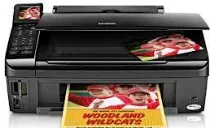
When using the Epson Stylus NX515 printer model, users should prepare a multifunctional device to print, copy and scan documents. At the same time, Epson Stylus NX515 has an internal print driver compatible with duplex printing and OS compatibility. Also, it uses the 4-color (CMYK) drop-on-demand MicroPiezo inkjet technology. Besides, the nozzle configuration comprises 128 nozzles, each for black, cyan, yellow, and magenta colors.
This package contains the following items:
- Printer Driver
- Scanner Driver
- Epson Status Monitor
- EasyPrint
- Epson Event Manager
This package contains the following items:
- Printer Driver
- Scanner Driver
- Epson EasyPrint
- Epson Event Manager
Epson Stylus NX515 Drivers for Windows
d932fa592bd13c07fcab7e382eccb7fb033170777975c0958be13472600d3566a054a45e1a6a46fbca6b4b6e684a718933d8aa9ce3851ce3bf537a27f9c05f73c80e18ec6b44e7eb00e922578402ba928f8c7d43ffcde82131bdfc7faa2bf97cdaf5d83a941341594ec72080674b6fcc1afb851e2a75ab2071d00a38d6762a50f32460294c130a9e0c509d9635aabe018f696ac640ad2b1698c547a799b5980e1ba621ead11d271b17c91b2556787307700e8d5cc70e75425acaa90bc2df49440161ed28ee329f4723f49d5f16aecce9fb95696003b58d1ae8ea42c43e748086ad652068d8cc3cee69ab2c040d0c7ccc7e3846046eb44d407b727883ff2da7436a3e4e001cc866a4db610523e48983234645830cf3f2fecb0ef8f120243a3c3b5b8c114cf1ab0ab5a8ee9bfdb62c22635ea898fd32b7aaef196cf5e4014de8c71c3777e40023b287b5c5bcc55a0695788140a2c9d1461efe82186686e46447b2a64b174656b7f7f195869e12abf162f2070bc4d2cc17bcaf0ac394f0ae8f5b49f9a93201e69f30153769c38007c020213cf90734a39f9cd36cfa37ac46a43214Epson Stylus NX515 Drivers for macOS
90b19618e6bce060d6ba79ed90bf7b526942d845dd987bfcb50b2ca4f10bea472e2833f460e26334722c7513e0e91d7cf2aa149a0aabc5acb0e9b1b6282f76d1476c13074f8bed2f5d75646ca65cf89f3af2744c69d123a59a0340f6fe90dab042b798803c32d92fb2d02f3ffee4258305e3abc866a476a7845ea3d46ae559f7a4ee144de6033003eaa529c8a14bbf6ada81572d383098e18c9008b9d417e0f603836d2d98dbfc8722315b7667373b851b9e9449b98dccb934acb3ffb109e88f3dee4cd767cb069e2dbe84397f91aebd12061a2181f517a59a28efa52ed0b1e20ecfebb58747d5d8b4a43f54b433ff36b284176953717512d313eca36e1b0c885546c857e0b9488b4e6314fb50f476048f8dd8c13db7da08dffad99d7c168a6bEpson Stylus NX515 Specifications
The compatible ink type is the DURABrite Ultra pigment ink type that is resistant to smudging, fading, highlighter, and water. The output quality also has print longevity of fade resistance of up to 118 years. Meanwhile, the minimum ink droplet size is about two picoliters (pl), while the best resolution is 5760 x 1440 optimized dpi. As for the print speed, the rate is 36 pages per minute (ppm) for both black and color printing.
Borderless Photo printing (4 x 6 inches) has a speed of 20 seconds on average. When printing laser-quality output, the rate is about 15 ppm for black documents, while color is about 9.3 ppm. Similarly, the photoelectric device for scanning is the color CIS line sensor through the color flatbed component. The Epson Stylus NX515 machine also has an optical resolution of 2400 dpi, while the hardware resolution is 2400 x 2400 dpi. Its maximum print resolution is up to 9600 x 9600 dpi a the interpolated rate.
The power requirements for this machine include a rated voltage between 100 and 120 volts AC with a frequency of 50-60 Hz. Besides, it comes with a full-year warranty limited in the US and Canada. However, the power consumption depends on the print mode of the machine, such as printing, standby, and off mode. For instance, standalone copy printing has a rate of 12 watts at ISO 10561, and the standby mode uses approximately 3.0 watts.
Technical Details
| Title | Epson Stylus NX515 Drivers |
|---|---|
| Device Type | All-in-one printer |
| Driver Version | Varies by driver and operating system |
| Available Downloads | Drivers |
| License | Free |
| Manufacturer | Seiko Epson Corporation |