
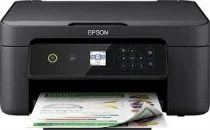
The ideal representation of the Epson Expression Home XP-3105 model includes an Epson micro piezo print head. This system comprises 180 nozzles for black document printing and 59 nozzles for printing in each color. The minimum ink droplet size is about three picoliters (pl) with a variable-sized droplet technology. Meanwhile, the print technology itself comprises pigment black and dye color inks. Users should also note the Epson Expression Home XP-3105 standard internal print driver for automatic duplex printing.
Epson Expression Home XP-3105 Drivers for Windows
8ebc0d0509bf2c376e240c41d0da6d271c7de8b8baed07c7ca8349ffbc3c2496cffde8ce5157fd802e5ecce22cc1846efb60a22d5e4cd6afa5a01b14ad120f12a71e6b0274ca9970858070e69fbc21b9788168abeb53d65ad75a5a71fc270bdbe296b0dd6f562045ca62037185b78ea08935c2397617465e6551a239e6f13b6cEpson Expression Home XP-3105 Drivers for macOS
5171386fd0c2b8da03a0e0c2c5df1064bc2d8878ec631cc3019f5a382f0077d21278a36f5a52a81a7638d788ac2815e94c9b5d9eb7a1c29f32d8718cab5fc9ea90071b11984600791b1ab1b58f654ee83a3a90fed5e5b6be2162f41461badfc7Epson Expression Home XP-3105 Specifications
At the same time, it can produce a quality resolution reaching 5760 x 1440 dots per inch (dpi). Its multiple functions include printing, scanning, and copying at the optimum level of performance. Also, printing at the ISO/IEC 24734 standard has a black and white printing rate of 10 pages per minute (ppm). The color printing has a print rate of 5 ppm. When using the Epson premium glossy photo paper, the print rate is 42 seconds per sheet.
Similarly, plain paper with an average weight of 75 gsm has a print rate of 42 seconds per page. However, black and white printing by standard rate is about 33 pages per minute (ppm). Then, the color printing rate is about 15 ppm for the same plain paper. The optical resolution is up to 1200 x 2400 dots per inch (dpi) for scanning horizontal and vertical sides. Also, it supports a contact image sensor (CIS) element through the flatbed component.
The device has an automatic duplex feature for A4 plain paper and borderless printing in media handling. The machine has an input paper tray that can hold up to 100 sheets of plain paper and 20 photo sheets. Concerning the supply voltage, the range is between 100 and 240 volts at 50 – 60 Hz. Meanwhile, the energy use depends on the various modes of the device.
Technical Details
| Title | Epson Expression Home XP-3105 Drivers |
|---|---|
| Device Type | All-in-one printer |
| Driver Version | Varies by driver and operating system |
| Available Downloads | Drivers |
| License | Free |
| Manufacturer | Seiko Epson Corporation |