
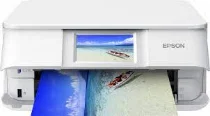
The Epson Expression Photo XP-8605 printer model belongs to a particular category, known as the Expression photo printers. The print technology comprises 180 nozzles for black and another 180 nozzles for each color. Meanwhile, the minimum ink droplet size is about 1.5 picoliters (pl) while having variable-sized droplet technology. Epson Expression Photo XP-8605 also comes with an internal driver capable of producing duplex printing with various OS compatibility.
Epson Expression Photo XP-8605 Drivers for Windows
7bc8405c052d0718c68a1099ea38177c0869c1db087a592659b7c50af82db542ed5fc1305884330b1ddfa510699c2f4e00f95b8af829ab96ecede2c78c825f5cd426e9b1b24a461a416883453d0d7d439db0c43d1b1545091be402fab04fa4a9e296b0dd6f562045ca62037185b78ea08935c2397617465e6551a239e6f13b6cEpson Expression Photo XP-8605 Drivers for macOS
dd2d3188754d59f5f6c95a499e4299ca148658d4e7bb140e88bebd0dd770589b94ce5d485aa8e24148bb4d4fe741a85685f084cf1da59095797eda2c0958779590071b11984600791b1ab1b58f654ee83a3a90fed5e5b6be2162f41461badfc7Epson Expression Photo XP-8605 Specifications
Meanwhile, the classification is a home and photo printer with multifunctions that include printing, scanning, and copying. During printing, this device meets the standard required according to the ISO/IEC 24734. It also works with the Claria Photo HD ink technology to produce an optimum resolution of up to 5760 x 1440 dpi. In this case, the speed of having a black and white document is 9.5 pages per minute (ppm).
The speed of printing color photos is about 10 seconds per 10 x 15 cm photo when using Epson premium Glossy Photo paper. However, color printing has a print rate of 9 ppm under ideal conditions. But when using plain paper with an average weight of 75 gsm, both color and monochrome printing are at the speed of 32 ppm. Moreover, the compatible colors include black, cyan, light cyan, yellow, magenta, and light magenta. The power supply is through the direct internal power input.
When scanning, the machine has an optical resolution of 1200 x 4800 dpi for the horizontal and vertical dimensions. It also has a compatible contact image sensor (CIS) element. However, the machine works with legal, letter, photo paper, envelopes, and custom sizes for compatible paper formats. The duplex printing also allows A4 plain paper of standard weight. The main input tray can accommodate up to 100 sheets of plain paper and 20 photo sheets.
Technical Details
| Title | Epson Expression Photo XP-8605 Drivers |
|---|---|
| Device Type | All-in-one printer |
| Driver Version | Varies by driver and operating system |
| Available Downloads | Drivers |
| License | Free |
| Manufacturer | Seiko Epson Corporation |