
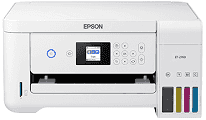
Epson ET-2760 Driver helps the computer send print and scan commands to the printer correctly. It guides setup on compatible Windows and macOS systems and manages USB or wireless communication. Supported applications can then use the printer’s printing, scanning, and copying functions. As a result, documents and photos reach the printer with the selected settings.
Epson ET-2760 Drivers for Windows
3fb1bcb62dfdccdf1882d110df5ab6e4d5482b54ebe5e541940463a89f69e180b9cc630fe5b5f3b97d168c2309aeea1a77dc9429613dc711d538540682294b87c632ae2ebe5e47602fce42af2aaa08839f0df983b49bf6e8069060a53941320b809681daaf89f14d142db8280ed370a3c92053bef3e85287c1a6b321e73a1c25180a81d0e184fc245546e5f7fc39027736594f04299a08ce50977b13f84b64fe6e5d23c64b3340a3885a44e0f76f2f847b6127f921b153afabf0c72b976e8fd6Epson ET-2760 Drivers for macOS
66747b85a886a20e0e215502028b589fd0cca64ef8b33a059829da713d7143941050228744064d6c38a90bbbea62c03e0a842f2bfeb80c5cec392ee6d13410313890085b1fec9b063db015dda111c327112867e8fd34c01cd3bc60a42bf5a740eacf3673b0dd255f4ec381c2dd1eedc4104253fc45f296b22adf6068fbdeca57319026e445ea179b27455527a34f991c0727f85cca0ee32f76c6d5a4406a2a82Epson ET-2760 Specifications
The Epson ET-2760 prints in color and also handles flatbed scanning and standalone copying. Four refillable tanks use Epson 502 ink bottles in black, cyan, magenta, and yellow. Menus and memory-card tasks appear on a 1.44-inch color LCD. The CIS flatbed accepts originals up to 8.5 × 11.7 inches. Since no automatic document feeder is fitted, each page must be placed on the glass by hand.
Printing reaches 5760 × 1440 optimized dpi, with ISO speeds of 10.5 ppm in black and 5 ppm in color. Automatic two-sided pages run more slowly at 6 ppm for black and 4 ppm for color. The scanner records at 1200 × 2400 dpi hardware resolution. Standalone copies reach 7.7 cpm in black and 3.8 cpm in color. Borderless photo output is limited to supported 4 × 6-inch paper.
A rear tray supplies all paper and holds up to 100 plain sheets. Capacity drops to 20 photo sheets or 10 No. 10 envelopes when those materials are loaded. Common sizes range from 3.5 × 5 inches through legal paper, and custom sheets can extend to 47.2 inches long. Printed pages collect in a 30-sheet output tray. Automatic duplexing is intended for compatible plain paper rather than every material accepted by the rear feed.
A nearby computer can connect through Hi-Speed USB. Wireless jobs travel over Wi-Fi 4 or Wi-Fi Direct, which can operate without a router. Ethernet is not built into this model. The card slot reads standard SD, SDHC, and SDXC cards, although smaller miniSD and microSD formats require adapters. With the trays closed, the body measures 14.8 × 13.7 × 9.4 inches and weighs 13.2 pounds. Standalone copying uses about 13 watts under the ISO 24712 test.
Technical Details
| Title | Epson ET-2760 Drivers |
|---|---|
| Device Type | All-in-one printer |
| Driver Version | Varies by driver and operating system |
| Available Downloads | Drivers |
| License | Free |
| Manufacturer | Seiko Epson Corporation |