
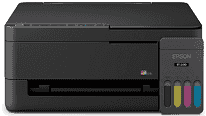
The Epson ET-2410 driver helps to create a good connection between the printer and the computer while installing and during normal operations. This software ensures that the connection is properly established and everything runs smoothly. The printer can also scan and copy, and there is the right software that makes sure that these features run smoothly.
Epson ET-2410 Drivers for Windows
1b367f9bfdb702d7f90b940d1d8720dcb21844c28f53a059f48e5ceb8927a86151740c860a2396d040b3d25802c91a33bfd237a3eb56c0fe5a1e0bb430c8becff01caf6e6468b71f307d7b893d9941cd989ea1afab48909b0dce6ef4d0e5daba8687b93c29df4c11c87ac4e8a595f4a94f0f5cb51411d4fcccbb98034230df9d180a81d0e184fc245546e5f7fc39027736594f04299a08ce50977b13f84b64fe6e5d23c64b3340a3885a44e0f76f2f847b6127f921b153afabf0c72b976e8fd6Epson ET-2410 Drivers for macOS
cd651877739a94cae90d12d7d4a7ca77b7b028f6df5f5daa0d8dd3d6c5e5219e85443945da509bc9a38c5fdda2b7eb4395c66b583852b0a4ffa0bddb54e7ae405634786b1f2229652b18f383910d525a276c938fa184e4e7ba8b10d104a16ea4319026e445ea179b27455527a34f991c0727f85cca0ee32f76c6d5a4406a2a82Epson ET-2410 Printer Specifications
The Epson ET-2410 is an EcoTank multi-function inkjet printer, using refillable ink tanks for black, cyan, magenta, and yellow colors. Using the Epson Micro Piezo printhead technology, it provides the maximum resolution of up to 5760 x 1440 dpi. Refillable ink tanks are ideal for frequent use at home, while studying, and at work.
This printer offers a print speed of up to 10 ppm for black and 5 ppm for color prints according to ISO standards. Faster speeds could be achieved during printing in draft mode. It supports borderless printing on photo media with a size of 10 x 15 cm. Duplex printing is not automatic; double-sided printing is possible manually.
Paper loading is done through the rear tray, allowing up to 100 sheets of plain paper. The supported media include A4, Letter, Legal, envelopes, and photo media. It is compatible with Epson photo papers and office papers. With the help of the feeder, it is possible to print everyday forms, students’ homework, letters, and color prints.
The connection to the computer is done using a standard USB cable. Wi-Fi or Ethernet interfaces are not available for the printer. The dimensions are approximately 375 x 347 x 179 mm, and the weight is approximately 3.9 kg. The printer’s compactness provides the possibility to place it on a small desk.
Technical Details
| Title | Epson ET-2410 Drivers |
|---|---|
| Device Type | All-in-one printer |
| Driver Version | Varies by driver and operating system |
| Available Downloads | Drivers |
| License | Free |
| Manufacturer | Seiko Epson Corporation |