
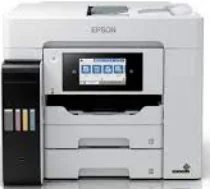
When using the Epson EcoTank L6580 printer model, be sure of multiple functions such as printing, scanning, copying, and faxing with ADF. When printing, this device uses the PrecisionCore print head, which has up to 800 nozzles each for black, cyan, yellow and magenta colors. In addition, it also has bi-directional printing with an optimum print resolution of 4800 x 1200 dots per inch (dpi). Meanwhile, the Epson EcoTank L6580 has an internal driver suitable for duplex printing and compatibility with different OS versions.
Epson EcoTank L6580 Drivers for Windows
aaf2f88e7617a336f5849126ab92af13c026b2d5df0fb5b331ff079c6c5b84efbf062e192d677c916a6a28a6546da80e777880aa7616f0974de6ee2005ffd0ca4eb72f0dc02ff5277a297cb294b250badfb68f5fee1a9412369e117fc8afcd5dd8062ed1cbc497b2897e51b0fc823863ba35a474c02d6b1e787065eb62930102Epson EcoTank L6580 Drivers for macOS
6515623e3802e48ce1a2776af19aefe8cc751ca253269ef5f60bc8c546dc7feae4ea0ad541ae5aa0b83ae8693a2c341100c0343140be0226ffe4d8c146adacd938f4aa68b70db93f55ec9257456db546ac0995630ec4d84302df5d388445c54590071b11984600791b1ab1b58f654ee83a3a90fed5e5b6be2162f41461badfc7Epson EcoTank L6580 Specifications
In printing, the specifications include the ISO 24734 with a speed of up to 25 images per minute (ipm) for black and color documents. This rate also applies to simplex or single-sided printing. On the other hand, double-sided printing by the same standard has a speed of 21 ipm for both color and monochrome documents. Also, the first page of printing takes about 5.5 seconds, whether in color or monochrome. It also has a draft text print speed of 32 ppm for both color and black.
The compatible printer language with this Epson EcoTank L6580 is the USC/P-R. And it is compatible with print emulation such as the PCL5, PCL6, PostScript, and PDF (ver1.7). Similarly, copying with this device can produce up to 999 copies from one original document. It can also reduce or enlarge the output image size within the range of 25 to 400% of the original document size. In addition, the maximum copy resolution is 600 x 600 dots per inch (dpi).
As a multifunctional device with the scanning feature, it uses the flatbed color image scanner. In copying, the rate is 22.5 ipm for both color and black at the ISO 24735 mode. The optical resolution of the scanning process is also about 1200 x 2400 dpi.
Technical Details
| Title | Epson EcoTank L6580 Drivers |
|---|---|
| Device Type | All-in-one printer |
| Driver Version | Varies by driver and operating system |
| Available Downloads | Drivers |
| License | Free |
| Manufacturer | Seiko Epson Corporation |