
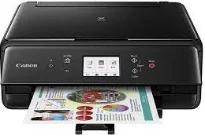
The Canon printers are exceptional products when printing at high speed and producing excellent print quality. The rate of the machine also varies according to the mode of the printer as well as the paper type in use. For instance, printing on photo paper 4×6 inches in size is at the rate of 39 seconds per page for borderless printing. However, black printing in the standard mode is about 15.0 images per minute (ipm). On the other hand, color printing runs at the rate of 10 ipm in the same print mode.
Canon PIXMA TS6020 driver Downloads for Microsoft Windows 32-bit – 64-bit and Macintosh Operating System.
Canon PIXMA TS6020 Drivers for Windows
e37f3591dcdd3c3a64422f4d303bd4b8fc966143537ab59dd57d06c3f45db6cd2b1251a7ec0571be7cfcf00bd99f11bb1876b1e2d56e024150d52595f18ceca712b384aaa11edfc728b0589e78196c463120b076ef1246e1437254b32a56f94d8dd427942e8e31c574841b714286f9171dafe7b49dd781ec9b62ff0cc61cf1a415e26104a051d3f79061242bb8114e3d81f35bbe709d14bb07a6284eb01471d0Canon PIXMA TS6020 Drivers for macOS
10fd8c0a4f6d81c2f2e89a67cd25e00589c2290b60b4d23f434548e4a48119b2d74205b6d825df6ae9ae64da31dc026383efd68d417dc9cd93beba8b39a51de6486df64f4a582d4a4b253150ebecf38cc18ec19376f4deafbb2cf5e5246b6ffb5f364309390bda740c4b7be8a1a87f77a8a1041593e3f9eff3660824ae48c242b95bda69d6378732d53da00d8768d67ad9d7cb191c4ca51b7fcd735bf4bcc0ef05fd9c59ffd568e0c41d201e512443bdc7912d4404afb84f877bd377e5fa8c61Canon PIXMA TS6020 Drivers for Linux
3b298716ad8b806fad72ed52714838921dea6f84253446a02d0e669afbc13804559acc98851ecf86000724ee268b473818b395c6b87524dc0d82ead6263a6ab598ba823924fb7835d6f2697a2561e0e92c44b64fc10b6f8086a7bbbe5ee998eabb8d108b2c3557f3dc258d47b560ce96608a006ec7b052a630e0a5f911da2413da7fddf03d95b487b55795812c9a27a00aa027a8f3bbcc76ead54ce07108976bcfb2af683f1d1ed0431948967bae872798d8b75da9eac1bfbf30aa8394220ab0Canon PIXMA TS6020 Supported Ink Catridges
Pigment Black Ink Cartridge PGI-270, Yellow Ink Cartridge CLI-271, Ink Cartridge Black CLI-271, Cyan Ink Cartridge CLI-271, CLI-271 Ink Cartridge Magenta
The number of nozzles in the printer cartridge is up to 4096, including 3072 nozzles for color printing. There are also 1024 nozzles for pigment black printing with this printer cartridge. Users have two basic print cartridge types, the PGI-270 for pigment black ink and CLI-271 for dye-based inks. This device’s general features include the presence of a liquid crystal display (LCD) touchscreen. It also has a 5-color ink system, creative park premium, auto power on/off, canon print app, and PIXMA cloud link.
The machine is also compatible with Mac OS X v10.8.5 to Mac OS v10.12 (Sierra). However, it is recommended for users of the macOS version 10.12.0 to update to the Mac OS v10.12.1 version for full functionality. And in terms of the mobile operating systems, it supports iOS, Android, Windows 10 mobile, Windows RT, and Amazon Fire devices. The standard interface options of the invention include the hi-speed USB port, PictBridge for camera connection, and Wireless/Wired LAN ports.
The Canon PIXMA TS6020 printer model has a width of 14.7 inches and a depth of 12.5 inches. The height is up to 5.5 inches while the weight is up to 13.6 lbs. It comes with a one-year limited warranty with the InstantExchange program.
Technical Details
| Title | Canon PIXMA TS6020 Drivers |
|---|---|
| Device Type | All-in-one printer |
| Driver Version | Varies by driver and operating system |
| Available Downloads | Drivers |
| License | Free |
| Manufacturer | Canon Inc. |