
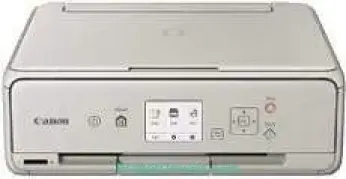
The maximum print resolution from the machine is up to 4800 x 1200 dots per inch (dpi) for the best printer performance. It functions in capacities such as wireless printing, copying, scanning, and cloud link. At the same time, it contains five individual ink tanks for pigment black, black, cyan, magenta, and yellow colors. The Canon PIXMA TS6052 printer model belongs to the same printer series as Canon PIXMA TS6050 and Canon PIXMA TS6051.
Canon PIXMA TS6052 driver Downloads for Microsoft Windows 32-bit – 64-bit and Macintosh Operating System.
Canon PIXMA TS6052 Drivers for Windows
d971bd55aa10fc6677eed31926f29023bcd5d0b4a2b00d5fc0475297505688afe37f3591dcdd3c3a64422f4d303bd4b8fc966143537ab59dd57d06c3f45db6cd12b384aaa11edfc728b0589e78196c463120b076ef1246e1437254b32a56f94d8dd427942e8e31c574841b714286f9171dafe7b49dd781ec9b62ff0cc61cf1a415e26104a051d3f79061242bb8114e3d81f35bbe709d14bb07a6284eb01471d0Canon PIXMA TS6052 Drivers for macOS
5c7309aeaa02802b3b0bfbee81bfc5d6df33e8425bff7f9b899e396d88a6e62010fd8c0a4f6d81c2f2e89a67cd25e00589c2290b60b4d23f434548e4a48119b2d74205b6d825df6ae9ae64da31dc026383efd68d417dc9cd93beba8b39a51de605fd9c59ffd568e0c41d201e512443bdc7912d4404afb84f877bd377e5fa8c61Canon PIXMA TS6052 Drivers for Linux
3b298716ad8b806fad72ed52714838921dea6f84253446a02d0e669afbc13804559acc98851ecf86000724ee268b473818b395c6b87524dc0d82ead6263a6ab598ba823924fb7835d6f2697a2561e0e92c44b64fc10b6f8086a7bbbe5ee998eabb8d108b2c3557f3dc258d47b560ce96608a006ec7b052a630e0a5f911da2413da7fddf03d95b487b55795812c9a27a00aa027a8f3bbcc76ead54ce07108976bcfb2af683f1d1ed0431948967bae872798d8b75da9eac1bfbf30aa8394220ab0Canon PIXMA TS6052 Supported Ink Catridges
Ink Cartridge Pigment Black PGI-570PGBK, CLI-571BK Ink Cartridge Black, Magenta Ink Cartridge CLI-571M, Ink Cartridge Yellow CLI-571Y, Cyan Ink Cartridge CLI-571C
Specifications
The compatible ink types are the classic ChromaLife100 inks with amazing productivity, quality and speed. When printing in black or monochrome, the printing rate is up to 15 images per minute (ipm). Besides, color printing in the standard mode also has an approximate speed of 10 ipm. Borderless printing on the 10×15 cm paper size runs at approximately 39 seconds per page. Then, the duplex or two-sided printing supports A4, A5, B5, and letter-sized papers.
The compatible paper types include plain paper, high-resolution Canon paper, matte paper, and semi-gloss. On the side of the maximum paper load, the rear tray can hold up to 20 sheets of photo paper. The front cassette can only accommodate 100 sheets of plain paper at optimum capacity. Simultaneously, the rear tray can support a paper weight between 64 and 105 gsm for the plain paper size. However, the Canon photo paper can reach a maximum weight of 300 gsm.
Scanning with this device uses the CIS flatbed photo and document scanner, which produces the best quality of output. The maximum scanning resolution is up to 1200 x 2400 dots per inch (dpi). It also has a scan speed of about 19 seconds per page and the maximum document size of 216 x 297 mm. Then, the scanning depth for input/output is 48bit/24bit for color and 16bit/8bit for greyscale.
Technical Details
| Title | Canon PIXMA TS6052 Drivers |
|---|---|
| Device Type | All-in-one printer |
| Driver Version | Varies by driver and operating system |
| Available Downloads | Drivers |
| License | Free |
| Manufacturer | Canon Inc. |