
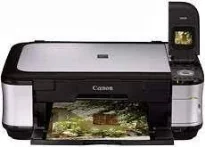
The Canon PIXMA MP558 printer model is exceptional when it comes to producing top quality at high speed. Its maximum resolution is about 9600 x 2400 dots per inch (dpi) for horizontal and vertical dimensions. The smallest ink droplet size for the machine is about one picolitre with all its compatible print heads and tanks.
Canon PIXMA MP558 driver Downloads for Microsoft Windows 32-bit – 64-bit and Macintosh Operating System.
Canon PIXMA MP558 Drivers for Windows
a2a1ac1855a261c573e59e5e025dde9ae06b54c61092a76f4ad1a4b6ff679823Canon PIXMA MP558 Drivers for macOS
567359f491782776a54baf62af9262bc6bde04697b01a4e13e3d3a4b98e260aa7946f4d3d2bab626db9f0251615a1f1612c1753d4ac4e00bb20127760ed526a946f2ee20e30775cc10b101c189700f18b5a8386f688a1fa939ff7cd3b9f2a6a39747867ce602936edcea5c9aec4567e66cd62824c1c55f5fee37703d7d585ac85676576ac59bcf010230b04e385525a8eaa737c040a6f5f502735a087016c3ff4adc4fac0c92f1eae44cfb916abf5e2c32faa732e0428902ea1ae0b325def692Canon PIXMA MP558 Drivers for Linux
44e0763ff4a7bd82bd94ad6cf2f08f9726f1c44fa46bd0079081ba8e2a0038e7fec724e978de5060f4e2b7b0e22b3c945414e7315573205a6084a7bd1d64b1442fc4dcd79d6644baeb0c8a0ee1b43dc9f59f44d21f773c0d85bfe2660a180b9a64aa2651a1e191237b81e83f959427f1306533b57b66dc724f570f0bbc9e8ba713564dade1a682d9d1806b92211fceca7453e575dc4e636535e542dd0c46b6281b2cda73781e3e394660d8dd8923b7214b6f7825181f301c8f8d3903941318c9Canon PIXMA MP558 Supported Ink Cartridges
Ink Cartridge Black CLI-821BK : Up to 3425 sheets, Yellow Ink Cartridge CLI-821Y : Approx. 530 sheets, Cyan Ink Cartridge CLI-821C : Up to 535 sheets, Ink Cartridge Magenta CLI-821M : Up to 510 sheets, Pigment Black Ink Cartridge PGI-820 : Up to 324 sheets yield
Black and white printing in the Canon PIXMA MP558 model runs at 9.2 pages per minute (ppm) by ISO standard. Whereas, the color printing pattern takes about 6.0 ppm by the same standard. Printing photos, however, takes slightly different rates. For instance, photo printing on a standard A4 size runs at 85 seconds and gallery at 39 seconds averagely.
This Canon PIXMA MP558 device allows the standard printable area for standard paper sizes such as A4, letter, legal, A5, B5, and envelope. It also has a rear tray that can hold 150 sheets of plain paper apart from the main tray capacity. Scanning is at a resolution of 2400 x 4,800 dots per inch (dpi) at the maximum yield. The speed for color scanning is about 18 seconds per page, and the machine supports the direct scan to memory feature.
Scanning is also compatible with the TWAIN/WIA scanning elements of Windows XP and Windows Vista only. In terms of copying, the rate is about 26 seconds for the first copy out time. But continuous reproduction in black runs at 8.2 CPM and continuous color copying at 3.8 CPM. This mode can also produce multi prints reaching 99 copies from a single original document.
Canon PIXMA MP558 has an operation panel with a liquid crystal display of 2 inches. The user interface options include a hi-speed USB 2.0 port, PictBridge, and memory card storage. The general OS compatibilities cover Windows 2000 SP4, XP SP3, Vista SP1, and Windows 7. Apart from Windows OS, the machine can also work with Mac OS X 10.3.9 to 10.5 and 10.6 OS versions.
Technical Details
| Title | Canon PIXMA MP558 Drivers |
|---|---|
| Device Type | All-in-one printer |
| Driver Version | Varies by driver and operating system |
| Available Downloads | Drivers |
| License | Free |
| Manufacturer | Canon Inc. |