
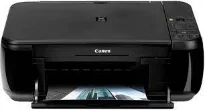
Canon PIXMA MP280 printer model has varying print speeds, depending on the model of the printer. For instance, borderless printing on photo paper has an approximate rate of 43 seconds per page. However, black document printing has a print rate of 8.4 images per minute (ipm). On the other hand, color printing has a production rate of 4.8 ipm under ideal conditions. It has 1472 nozzles for all kinds of print, which comprise 1152 nozzles for color.
Canon PIXMA MP280 driver Downloads for Microsoft Windows 32-bit – 64-bit and Macintosh Operating System.
Canon PIXMA MP280 Drivers for Windows
275c8969667ebd44ef372786cc43a1da90bc690e37c6f63946996c1cf06840a9adad9453d3b864f0ab74595bbcc828f552af730dd3dfe8a3db0faefdd4ff4e698dd427942e8e31c574841b714286f9171dafe7b49dd781ec9b62ff0cc61cf1a415e26104a051d3f79061242bb8114e3d81f35bbe709d14bb07a6284eb01471d0Canon PIXMA MP280 Drivers for macOS
d3436079312fb6923a758e4df866ded6eb06f483709af43c070ebf5a4d840aebc25e063e8a2a7977c99654257c1a1d628bb460ecef98124860dfceda208cea3e20883d8e9410410235d6221e33b87476476670c2e57ea9dff2758979211fdbb83007eff984a7b45fdcc251ed3b50e22c2a6e2367342b4141237e9b931363fd124c6c7b1549b8c400addc5d2bd2454b01dc8cff567bb17e2343240d9cba201d6aa52a90a0f3d4b2e3137b65075f449b7693e53b4f4ffbab6301307c0a8dd35ef85b6a5705816c21589c9c78210a1fb52051a5293556ac525e462639ded15b9c53189c7d622d017b090b42ab2540bd99690b722fa81596000cb10164b7487facb35676576ac59bcf010230b04e385525a8eaa737c040a6f5f502735a087016c3ff655a6f0976de67f92e80fc94f3e0b44cedfb37ad4c627703f3397f287d30d20eCanon PIXMA MP280 Specifications
Ink Cartridge Details: CL-211 Color Inkjet Cartridge, PG-210 Black Inkjet Cartridge
Besides, the Canon PIXMA MP280 supports the minimum ink droplet sizes of 2 and 5 picolitres (pl). Its resolution level is 600 x 600 dots per inch (dpi) for black document processing. However, the maximum level of print resolution for colored documents reaches 4800 x 1200 dpi. It is also compatible with the photo paper sizes, legal, letter, and US envelopes. Apart from the standard sizes, this machine also supports custom paper sizes.
On the other hand, the Canon PIXMA MP280 machine is compatible with various paper types such as straight, glossy, semi-glossy, and matte. In more detail, the media types include high-resolution paper, super high gloss, photo paper pro platinum, and matte photo paper. The basic print features may consist of an auto photo fix II, borderless printing, full HD movie print, photo printing, and template print. In the output tray, the paper loading capacity is up to 100 sheets of plain paper.
The scanner type is in a flatbed shape containing a contact image sensor (CIS) element. This model also has an optical resolution of about 1200 x 2400 dpi, while the interpolated resolution is up to 19200 x 19200 dpi. Scanning also contains auto document fix, gutter shadow correction, auto scan mode, and push scan. The color depth is about 48-bit for internal and 24-bit for external methods.
Technical Details
| Title | Canon PIXMA MP280 Drivers |
|---|---|
| Device Type | All-in-one printer |
| Driver Version | Varies by driver and operating system |
| Available Downloads | Drivers |
| License | Free |
| Manufacturer | Canon Inc. |