
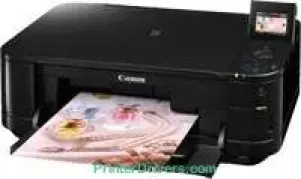
The available functions while using the Canon PIXMA MG5140 model include printing, scanning, copying, use of a camera, and memory cards. This machine is also exceptional when it comes to mobile phone direct printing without compromising quality. The ideal maximum print resolution is up to 9600 x 2400 dots per inch (dpi) at the best print performance. Besides, the machine has a sophisticated inkjet print technology that supplies a minimum of 1 picoliter of ink by volume.
PIXMA MG5140 driver Downloads for Microsoft Windows 32-bit – 64-bit and Macintosh Operating System.
Ink Cartridge Details
PGI-425 Pigment Black Ink Cartridge – Upto 325 pages
Black CLI-426 Ink Cartridge – Yields approx 550 pages
Ink Cartridge CLI-426 Cyan – Approx 445 pages
CLI-426 Magenta Ink Cartridge – Page yield upt0 445 pages
Yellow CLI-426 Ink Cartridge – Upto 445 pages
Canon PIXMA MG5140 Drivers for Windows
a616d272a63faaf95f18498046cecf3641779ddf6b0fb31e4e2d15635a60470a29c6aa798eb3a344d727d563e05b5d4c73a3039855e0cff88c2f2a6cee82b38427b98a83fc69f94a295f5def00eae3a23e247c926a034261f505525cc38e528bCanon PIXMA MG5140 Drivers for macOS
3f4394d9870f93e6e56c8bab1ac2c4639e4c4dfa462f37755c643fb88c639577f336f0431a3e324d05c81218a4fa7cf9fdb004abbb3bcb139c5f08bc3c31b1749c600458cf63ec575772025903d30bbcd645720f15022c98bea22d8354493ac446f2ee20e30775cc10b101c189700f18b5a8386f688a1fa939ff7cd3b9f2a6a35676576ac59bcf010230b04e385525a8eaa737c040a6f5f502735a087016c3ff12a55c98a0d90a78c1f44ccf6ee605a7236ffb7469bdb733f4b9d8f72f53615aCanon PIXMA MG5140 Drivers for Linux
8243c42b835a2dec24b37c8f584ccd12ec5269bfbcf5a51575bbe61c934c598fa95dd4ca491a9e8acc3e4ee35cc84904680e82d89ff04a23dda1b0ccffbb8a7a66d0391083da40f0b8dfb56394a1fdba52b721ea860356dfc4c5fbf444d2c680fab6b764409f17a674ba31e45a515353cdf027562b2daee96c316bb86d6d6340Canon PIXMA MG5140 Specifications
In terms of speed, it varies depending on the Canon printer mode, including black, color, and borderless printing. For instance, photo lab quality speed at the borderless mode can run at 39 seconds of average speed. Monochrome or black printing is at a rate of 9.7 images per minute (ipm). Also, color printing speed is at the rate of 6.1 ipm at the ESAT mode. With a single ink technology, five separate ink tanks are compatible with this device.
The compatible standard cartridge models include PGI-425PGBK, CLI-426C, CLI-426M, CLI-426BK, and CLI-426Y models. Also, the black pigment cartridge can produce 323 pages of documents or 2330 photos. Also, the CLI-426BK model can provide 4335 pages of documents or 770 photos at the best performance. Supported media types include plain paper, envelopes, photo paper pro platinum, t-shirt transfer, and photo stickers.
The other paper types include matte photo paper, high-resolution paper, glossy photo paper, photo paper, plus semi-gloss. In terms of the media input, the rear tray can hold up to 150 sheets of plain paper at the optimum level. However, the cassette can hold up to 150 sheets of plain paper as well. But considering the standard media sizes, the machine will work with A4, B5, A5, legal, letter, DL envelopes, COM#10 envelopes. It also supports a weight between 64 and 105 gsm for plain papers.
Technical Details
| Title | Canon PIXMA MG5140 Drivers |
|---|---|
| Device Type | All-in-one printer |
| Driver Version | Varies by driver and operating system |
| Available Downloads | Drivers |
| License | Free |
| Manufacturer | Canon Inc. |