
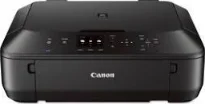
The first conspicuous feature of the machine is the liquid crystal display (LCD) screen, which is about 2.5 inches in size. Besides, its borderless printing of photos supports a maximum capacity of 8.5 inches by 11 inches. It also has a maximum print resolution for color documents at 4800 x 1200 dots per inch (dpi). The ink droplet size is only about two picolitres through inkjet technology. The Canon PIXMA MG5622 model is an ideal product for tablets, smartphones, and cloud printing.
Canon PIXMA MG5622 driver Downloads for Microsoft Windows 32-bit – 64-bit and Macintosh Operating System.
Canon PIXMA MG5622 Drivers for Windows
e78b9037220e8228e1fafa45d4c9cb73c4c37b745b4a229b848dcc8d60cfd4482b691627068b4166013faeb86202db3111798d0ce5c3685349305bb92b959a01f6873f5ba20700b1ae5058608dde8607bb9b6eba4aac05b7c86eab1ebb44df258dd427942e8e31c574841b714286f9171dafe7b49dd781ec9b62ff0cc61cf1a415e26104a051d3f79061242bb8114e3d81f35bbe709d14bb07a6284eb01471d0Canon PIXMA MG5622 Drivers for macOS
5cd3c3e76cb0d5a3fe07d62b1a346151e331d0f53fd07ff2299ed84eda48ec08f4bc1919113db1e4e1cf7afcf9387abe3e68379f9b6a296dcb69e1a70119484c32a69059d3d8ce0a4dc45b2a7b288503803601bc9b38aea37c4c4fd3f76c87b71afeb535ed397255d08a42020061171252a1a3849ea8a8a96d7cfaa19ec0d7acc7f59628133eaf16ebbebdede3e5df9a69d1e9b12cd7b61c9f4fbb780e4efb5a8946a6442a6cae0e5642f76103e12a7bbc9855fe176f36a73fd5777f10b8e9a9Canon PIXMA MG5622 Drivers for Linux
07a441231fa9e7cc7c32e1ef126916ab54945382facf01e68a00785beacebf92e5bbd191ec8b36a204cc2c8c2468d1ee1050ea53b68b304c5c268eda8537f51c42a5c9e956c701f88537471eb1054f38a293e3df4396cdb337c0c3ecdcaa5ae4015e689b9106804871be22771742a2c5046ee40f89bf856058036c909055bdf15482b5bac88cc7a857a527573de16a95c7bfae5d3fac9efd7c5dbd957cc59c8c468103a27a4bfeb20f9233c45f97afa807091ca97255b94b129402a00a56cb20Canon PIXMA MG5622 Supported Ink Catridges
Ink Cartridge Pigment Black PGI-250, Ink Cartridge Black CLI-251, Cyan Ink Cartridge CLI-251, CLI-251 Ink Cartridge Magenta, Yellow Ink Cartridge CLI-251
Furthermore, the Canon PIXMA MG5622 printer model also has other mobile printing features such as Google Cloud Print and Apple AirPrint. There are also installed apps, the PIXMA Printing Solutions (PPS), Easy Photo Print, and auto photo fix II. As an energy-star rated printer, it is suitable and safe for use in the environment. The device is also a multifunction device with the ability to print, copy, and scan documents at an exceptional quality level.
The scanning features of the Canon PIXMA MG5622 machine include the auto scan mode, network scan, push scan, and wireless scanning. In terms of the color depth, the output level is about 48-bit and 24-bit for internal and external modes, respectively. The other features include a 5-color ink system, a creative park premium app, auto power on/off, and an EPEAT silver rating. At the same time, the machine supports various versions of Windows OS and Mac OS.
Some of the supported Windows OS versions are Windows 8, 8.1, 7, 7 SP1, Vista SP1/SP2, and XP SP3 32-bit. Apart from Windows OS versions, the machine also supports Mac OS X v10.6.8 to 10.10 and iOS, Android for mobiles. The standard interface options in this machine include the wireless LAN (IEEE 802.11b/g/n), and the hi-speed USB PictBridge. This machine has a net weight of 13.8 lbs.
Technical Details
| Title | Canon PIXMA MG5622 Drivers |
|---|---|
| Device Type | All-in-one printer |
| Driver Version | Varies by driver and operating system |
| Available Downloads | Drivers |
| License | Free |
| Manufacturer | Canon Inc. |