
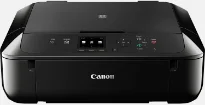
Canon PIXMA MG5750 is capable of producing top quality print at high speed. It offers a maximum print quality of up to 4800 x 1200 dots per inch (dpi) at the top-notch level. Also, five individual ink tanks make up the print technology system. The different ink tanks are for pigment black, black, cyan, yellow and magenta colors. Also, the inkjet technology also has the inkjet FINE print head with a minimum ink droplet size of 2 picoliters (pl).
Canon PIXMA MG5750 Drivers for Windows
416c8e48e7d42ed300c1230441195854ebeffe5cfad868048c75934ee9a388539557cf6b3bedcdcab9fe72443a4bbfc3869ebf0dbc0f2d106b29994f80102194aa504b19f772cd5909dd48e24da4210fd2e190620a956f693a0d0abe83e0608b8dd427942e8e31c574841b714286f9171dafe7b49dd781ec9b62ff0cc61cf1a415e26104a051d3f79061242bb8114e3d81f35bbe709d14bb07a6284eb01471d0Canon PIXMA MG5750 Drivers for macOS
b5b5e87f0af6fd26aaeac7c14a111d1201a85b3850db912672d7cbcc6dad4d24ed44acf79c0e06eaca5b4d4885337b8b1af5308cbaf1fd2dd97c3be40d2eb990c84f72759e170520da760a9d9942f0ad0abc6a976641eda7bfdb00a59f4f607d3e239ef26f1ddcdb36e3f16285998a1e379c51301a3ee8525cf77f0f5b494a173e239ef26f1ddcdb36e3f16285998a1e379c51301a3ee8525cf77f0f5b494a17ee36dc622acdf4effd044fe9d14178331404dffaeac891182fa7e430ebcca679511df8199951cd3d48d92469449ac548989fe9c193a242788e3d2a509047e624Canon PIXMA MG5750 Drivers for Linux
bec7bb37ce410ea1418a52526f9f7c0e0626979819ce6f7992ef245b37da7dd3df5992a5983f395c1da1be152a2e62128c95bf0e737c1123dc7f4674a0fea5582d7f00f020071a14df5861e1b8dd008d7c9a516fb9276d89954d505833ae728137cad11b1ed7b646b798e0de36585c192ff44849a818f88c0a3daebb4d879dad7bf0dd824d6a6ac44c8b5d53a0cb4b50f6aa398da50cdd7ace18cf0678eaac35e29c5c6ddbcbd2de4f90055023a3676b168703f6f3bf2901bca597522bde93f2PIXMA MG5750 driver Downloads for Microsoft Windows 32-bit – 64-bit and Macintosh Operating System.
Ink Cartridge Details
Ink Cartridge CLI-551 Black – Page Yields Upto 376 pages
Pigment Black PGI-550 Ink Cartridge – Yields Upto 300 pages
Yellow CLI-551 Ink Cartridge – Approx 347 pages
CLI-551 Cyan Ink Cartridge – Yield upto 345 pages
Ink Cartridge CLI-551 Magenta – Yields Approx 306 pages
Printing with this Canon PIXMA MG5750 machine can reach a speed of 12.6 images per minute (ipm), but that is for monochrome documents. Color documents, on the other hand, can produce output at the rate of 9.0 ipm. Also, photo print speed is up to 41 seconds for borderless pages of 10×15 cm size. This same borderless printing supports the use of A4, letter, and sized photo papers. It has two-sided printing that works for auto duplex print for both sides of the paper page.
When scanning with this Canon PIXMA MG5750 device, the usual component is the contact image sensor (CIS) element. This component is essential for the production of both photos and documents. It has a maximum scanning resolution of 1200 x 2400 dpi and a speed of 19 seconds on average. The scanning depth for input/output is 48bit/24bit for color and 16bit/8bit for the greyscale mode. Furthermore, scanning has a maximum document size of not more than 216 x 297 mm.
When copying, the optimum speed for the first copy out page is about 20 seconds. In comparison, the subsequently copied pages run at a rate of 7.2 ipm. It can make multiple copies, up to 99 copies from a single original document. Also, the typical copy functions include document copying, photocopying, borderless reproduction, 2-side print, and the frame erase text.
Technical Details
| Title | Canon PIXMA MG5750 Drivers |
|---|---|
| Device Type | All-in-one printer |
| Driver Version | Varies by driver and operating system |
| Available Downloads | Drivers |
| License | Free |
| Manufacturer | Canon Inc. |