
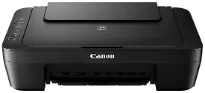
The Canon PIXMA MG3029 model belongs to the PIXMA photo-printer family series. When printing in black, the rate of production is approximately 8.0 images per minute (ipm). On the other hand, color printing has an approximate speed of 4.0 ipm. The total number of print nozzles is up to 1280, which includes 960 nozzles for color printing. Conversely, black printing works through 320 print nozzles. The machine has 2 or 5 picoliters as the minimum droplet size concerning the ink droplet volume or the size.
Canon PIXMA MG3029 driver Downloads for Microsoft Windows 32-bit – 64-bit and Macintosh Operating System.
Canon PIXMA MG3029 Drivers for Windows
59615c03070c3050dc8d55a84734b0633254f94060cef68a78ebc4d1f30bc0fd63323fa22a51bf7d1d0f8be9ccfca7674fa0f4f7415559476fb095f0dd75d07b1365ecdb983425c0c635f5b7b8f840661e9e147ae7fbba9fc86a2cde34bdccbe15e26104a051d3f79061242bb8114e3d81f35bbe709d14bb07a6284eb01471d0Canon PIXMA MG3029 Drivers for macOS
560c8e2655bce2a21abf01b29852d759bde8802033186ed3ae21cb5566c61a1b07974354f4e3ec70bb3ea9e2bc3dd229389fd5f1fcd418d72f73574377f0493a60886487fe90ebf22880961aac01fece99772beb9c47e5df106f03762cb154035f364309390bda740c4b7be8a1a87f77a8a1041593e3f9eff3660824ae48c24218a128f34728f707a5dfd8e2d370c338880cd924f858734f79d68b8a51b522d505fd9c59ffd568e0c41d201e512443bdc7912d4404afb84f877bd377e5fa8c61Canon PIXMA MG3029 Specifications
Supported Ink Cartridges
PG245 Black Ink Cartridge – Page Yield upto 180 Pages
CL246 Color Ink Cartridge – Upto 180 Pages
The compatible cartridge models include PG-245 for Black Ink and CL-246 for color printing. Apart from the standard ink cartridge models, the machine is also compatible with the XL cartridge model counterparts. These other compatible cartridge models include PG-245 XL for Black Ink supply and CL-246 model for color ink supply. In contrast, the standard paper sizes include A4, A5, B5, Letter, legal, photo sizes, DL envelopes, and COM10 envelopes.
In terms of paper type compatibility, it includes plain paper, photo paper plus glossy II, and photo paper glossy. Considering the other printer features, the machine has a FINE cartridge hybrid ink system, built-in Wi-Fi, Cloud Print, and Mobile device printing. Others are Canon Print inkjet/SELPHY modes. Its output tray can hold up to 60 sheets of plain paper or 20 4×6 photo paper sheets. While copying, the machine has a rate of 28 seconds for the first copy out page.
Other copy features apart from a standard document include multiple copies of between 1 and 21 pages. Its scanner type is through the flatbed feature with a contact image sensor (CIS) element. This scanner also has an optical resolution of up to 600 x 1200 dots per inch (dpi). However, the interpolated resolution is up to 19200 x 19200 dpi. Other related features to scanning include auto scan mode, attach to e-mail scan, and a push scan.
Technical Details
| Title | Canon PIXMA MG3029 Drivers |
|---|---|
| Device Type | All-in-one printer |
| Driver Version | Varies by driver and operating system |
| Available Downloads | Drivers |
| License | Free |
| Manufacturer | Canon Inc. |