
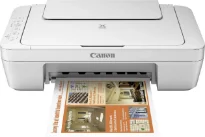
The Canon PIXMA MG2950 model has exceptional qualities, including a maximum resolution of up to 4800×600 dots per inch (dpi). Also, it has a print technology comprising 2 FINE cartridges for black and color document printing. Besides, this same inkjet system has a minimum ink droplet size of 2 picolitres (pl). In terms of the printer speed, monochrome or black printing runs at a rate of 8.0 images per minute (ipm).
Canon PIXMA MG2950 Drivers for Windows
45e7547802c419056493d11c607a377aa66870cb1704e7f1738190035a13873c94ccafea61ef8ce2c6038a0f8001971e1e00075630b7c06a93dd23ebba7f130589e88bf1c8e0963d5c07bd98001c6022fefe5b98cba487b49d5ab7e3767d66008dd427942e8e31c574841b714286f9171dafe7b49dd781ec9b62ff0cc61cf1a415e26104a051d3f79061242bb8114e3d81f35bbe709d14bb07a6284eb01471d0Canon PIXMA MG2950 Drivers for macOS
b0d12519e79bb60c4cc8d37171bec8178158d0f2c81aa152f9e5aa3766eb84eaed35f1d7c4f1f7e58833b47875e0a913db0c27405c875693ba0c59460936fe6332a69059d3d8ce0a4dc45b2a7b288503803601bc9b38aea37c4c4fd3f76c87b7b219dcba0f4008395e336399e5e441469c3ef651496500802afc00a16408ce2c1afeb535ed397255d08a42020061171252a1a3849ea8a8a96d7cfaa19ec0d7ac05051b78f85d213c11c87ddc8aed2e84b7e17b06742c9487a790917f3cc89b3f8946a6442a6cae0e5642f76103e12a7bbc9855fe176f36a73fd5777f10b8e9a9Canon PIXMA MG2950 Drivers for Linux
07a441231fa9e7cc7c32e1ef126916ab54945382facf01e68a00785beacebf92e5bbd191ec8b36a204cc2c8c2468d1ee1050ea53b68b304c5c268eda8537f51c42a5c9e956c701f88537471eb1054f38a293e3df4396cdb337c0c3ecdcaa5ae4015e689b9106804871be22771742a2c5046ee40f89bf856058036c909055bdf15482b5bac88cc7a857a527573de16a95c7bfae5d3fac9efd7c5dbd957cc59c8c468103a27a4bfeb20f9233c45f97afa807091ca97255b94b129402a00a56cb20PIXMA MG2950 driver Downloads for Microsoft Windows 32-bit – 64-bit and Macintosh Operating System.
Ink Cartridge Details
PG-545 Black Ink Cartridge – Approx 180 pages
Colour CL-546 Ink Cartridge – Yields upto 180 pages
On the other hand, color printing has a speed of 4.0 ipm but doesn’t support borderless printing. Duplex printing is also possible but only works by manual operation with the user. The Canon PIXMA MG2950 printer model also works with the PG-545 (black) and Cl-546 (color) cartridges for standard production. Apart from these two cartridges, the machine is also compatible with PG-545 XL and CL-546 XL cartridges for higher yield.
In terms of the printer cartridge yield, the standard options can produce 180 pages each. But the XL cartridge models will print up to 400 black pages and 300 color pages, respectively. Also, it supports standard media types, such as plain paper and envelopes. But the other types are photo paper plus glossy II and glossy “everyday use” media types. The rear tray has a maximum capacity of 60 sheets of plain paper.
On the other hand, standard paper sizes include A4, A5, B5, Letter, legal, photo paper, DL envelopes, and COM10 envelopes. By the way, the range for paper load should be between 64 and 105 gsm. However, if the Canon photo paper is in use, the machine allows a maximum weight of 275 gsm. The compatible scanner type is the contact image sensor (CIS) flatbed document and photo scanner. Its scanning resolution cannot exceed 600 x 1200 dots per inch (dpi).
Technical Details
| Title | Canon PIXMA MG2950 Drivers |
|---|---|
| Device Type | All-in-one printer |
| Driver Version | Varies by driver and operating system |
| Available Downloads | Drivers |
| License | Free |
| Manufacturer | Canon Inc. |