
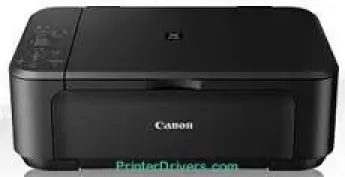
The Canon PIXMA MG2240 printer model is a classic choice among the PIXMA photo printer series. A multifunctioning device can print, copy, and scan documents to produce excellent-quality photos. Some of the printer box contents include the machine itself, two FINE cartridges, software, and a user manual CD. Other items include a power cord and a setup guide that can enhance the user experience.
Canon PIXMA MG2240 driver Downloads for Microsoft Windows 32-bit – 64-bit and Macintosh Operating System.
Supported Ink Cartridges
Black PG-440 Ink Cartridge – Approx 200 Pages
CL-441 Tri-Colour Ink Cartridge – Yield upto 220 Pages
Canon PIXMA MG2240 Drivers for Windows
f9b481a6f7745f0dceb83ea243e6f846626e60c38f1e81cfc5a5b562207a35c8a28406db1a643d4a2aa48fe2ad16dcb0daf0352ae90d4e0fb70e5c41097e3a73Canon PIXMA MG2240 Drivers for macOS
3b1b7f9917e0479dc46166be5e4e21ff174053856bdac535b7fc493af805605a53982ea91bb65782dfa5a248b04d2890b775a9279462f7e56550e4af8b8762ea93388fdfd3948c3ad498c4eff49b199dab5a04730f39c14365a4dad30fdf4bfef794098dd785a616db04fc50284d3d023598c2bcc6551f4bf46d2bb11b28ad3885bbb86edbab1c23f80e43bff041dc34c6eab79a70b7266fa6466271b69880b285bbb86edbab1c23f80e43bff041dc34c6eab79a70b7266fa6466271b69880b27548f749299bbf3b830139b33571299ffdacbffba73da0ef2f8ceb6460c2d259925500bfea88020e6ada8b117d368d7095519798328a2470e563f31ec1830cc1Canon PIXMA MG2240 Drivers for Linux
8aecc2d7b100db8acd156d6d507d3ba279f838684514f8958c2db820a9b5366c314f3792702f487f12706a474fa88036abb0b63d9619c3e631d7e91ffa22fb428b6d408f18191f19465ee8fc31aa08455e8bec186fdd3f02ee822f53a9b086a9149b41d82ea25be236f1cf02ac94a7a1b33bbd6ab069267ad328eb6f6fa21bd304900c594d8bf5292c2bd4f3831c32b5b5634aa8f16045e7cc1e27f642f02b598ab1b3a357064715e97f58d95a10a350135272b1df37cf0428dc535eeb9779dcCanon PIXMA MG2240 Specifications
This machine can produce up to 4800 x 1200 dots per inch (dpi). At the same time, the device has an inkjet FINE print head technology for optimum performance. This model has a 4-color system with a minimum ink droplet size of 2 picoliters (pl). Simultaneously, the FINE cartridges are the ChromaLife100 type, which is exceptional for top quality. Similarly, the machine produces a speed of 8.4 images per minute (ipm) for black and white printing.
In the same ESAT mode, color printing has a speed of up to 4.8 ipm. Similarly, borderless printing with this device has an approximate rate of 44 seconds. The machine, in borderless printing mode, supports A4, letter, and photo sizes. At the same time, it supports duplex or two-sided printing with manual operation. Furthermore, other print features include fit-to-page print, scaled print, booklet print, poster print, multiple pages per sheet print, and collate quality.
Some of the physical features of the machine include a net weight of 5.3 kg. The width is up to 449 mm, and the depth is 304 mm, while the height is up to 152 mm. Similarly, the acoustic noise level of this machine is approximately 43.5 dB. At the same time, some environmental properties must be in place for the printer’s optimum performance. For instance, the supported temperature range is between 5 and 35°C.
Technical Details
| Title | Canon PIXMA MG2240 Drivers |
|---|---|
| Device Type | All-in-one printer |
| Driver Version | Varies by driver and operating system |
| Available Downloads | Drivers |
| License | Free |
| Manufacturer | Canon Inc. |