
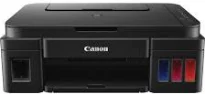
When printing with the Canon PIXMA G3200 printer model, users can expect an average speed of 60 seconds per page. This rate applies to borderless printing on 4×6 photo paper. However, black/color printing runs at 8.8/5.0 images per minute (ipm), respectively. The standard mode of printing with this device is the ESAT mode, which is for continuous printing. The total number of nozzles in the machine is up to 1472.
Canon PIXMA G3200 driver Downloads for Microsoft Windows 32-bit – 64-bit and Macintosh Operating System.
Canon PIXMA G3200 Drivers for Windows
36604aceaad519f1e0737cc49f9a3ef61d9967e6ea9863f24fa12eba024a99e2fc3127786394de09a93823031dfda71078468d7286fb9fe880b4a5576e1683cf505ce0e5211ea6cba6b23dd9b4bbfc6c47de48df69ddd972b67cce93b894f5c18dd427942e8e31c574841b714286f9171dafe7b49dd781ec9b62ff0cc61cf1a415e26104a051d3f79061242bb8114e3d81f35bbe709d14bb07a6284eb01471d0Canon PIXMA G3200 Drivers for macOS
d9ce54510e927ae0c77f906d176208eefea56817abd23d7fe0dbdae97a859a4910725712df7de9fe9446fbcfc55f78752be9386e3bc51ffff599ae2cafee9259521dffc7a38957c8a79ada27b932f52b9e8233caab9f696c20df51a7e0d3c0b43e239ef26f1ddcdb36e3f16285998a1e379c51301a3ee8525cf77f0f5b494a17c70349786e1909788435c4da6eec8a8622fb71711807754a6a207c080e91d97b3e239ef26f1ddcdb36e3f16285998a1e379c51301a3ee8525cf77f0f5b494a17511df8199951cd3d48d92469449ac548989fe9c193a242788e3d2a509047e624Canon PIXMA G3200 Drivers for Linux
c734410e193a8f804762f74b1654c93c3edc86b89acb0985f70474896f1f0ab6efb7285486c00b883d00df36762448a786d3935c318ed68a6335092545b6c3b66a4dae55415f28b7f60f0c0e9761219007225f7a15748c6cd14b199917ff4e87a2b259b917843e101e87ec6a1f5893a5101223d527fe67393636f608de0dd623faa3787a330752849815775cfac08eaae801d3de5b2ba5df06049bea910b6304b78f1e6c9d6d38a6ef2a9ef04499bef67d4494ec98e55c9338c58b56ef60517fCanon PIXMA G3200 Supported Ink Catridges
Pigment Black Ink Cartridge GI-290 BK, Cyan Ink Cartridge GI-290 C, Ink Cartridge Yellow GI-290 Y, Ink Cartridge GI-290 M Magenta
Out of the total nozzles, 320 nozzles are for pigment black printing, while 1152 nozzles are for color printing. Similarly, the optimum print resolution a user should expect is up to 4800 x 1200 dots per inch (dpi). There are only a few cartridges that are compatible with this printer model Canon PIXMA G3200. Two of those cartridges are the GI-290 BK for pigment black ink and GI-290 C/M/Y for dye-based inks. Similarly, the various ink tanks have varying fill volumes of the ink they can contain.
For instance, the black pigment cartridge will take up to 135 ml of ink, while others take 70 ml of ink each. Some of the compatible paper sizes that apply to this machine include US #10 envelopes, letter, legal, and 8×10 photo size. Other photo sizes include the 5×5 square, 4×6, 5×7, and 8×10 photo sizes. The paper type compatibility includes plain paper, high-resolution Canon paper, photo paper glossy II, and photo paper plus semi-glossy.
Some of the typical printer features include auto photo fix II, borderless printing, business card printing, and Canon Print app. Others are document printing, easy photoprint, full HD movie print, Google Cloud Print, the high page yield, and image cropping. The output tray of this device has a maximum capacity of 100 sheets of plain paper. Similarly, it can accommodate 20 sheets of 4×6 photo paper for the best quality products.
Technical Details
| Title | Canon PIXMA G3200 Drivers |
|---|---|
| Device Type | All-in-one printer |
| Driver Version | Varies by driver and operating system |
| Available Downloads | Drivers |
| License | Free |
| Manufacturer | Canon Inc. |