
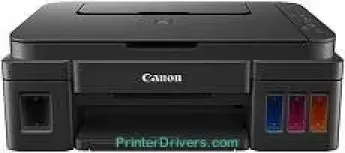
The Canon PIXMA G2200 model is an ideal product for high volume printing and copying that remains economical. It can print, copy, and scan with optimum finesse and speed as a multifunction or all-in-one device. It runs on a MegaTank ink reservoir system that allows up to 6000 pages of very sharp images in black. On the other hand, the maximum printer capacity when printing color pages is up to 7000 pages.
Canon PIXMA G2200 driver Downloads for Microsoft Windows 32-bit – 64-bit and Macintosh Operating System.
Canon PIXMA G2200 Drivers for Windows
e440ceb50fac434e52cb6476bf9490684628d7c2a1f482b2fed38f96d1c550fba7050139357e6bef28e12344c8391591f3cb33712add7e599d157c8535c3e25d771a75e78d7a603462a52b5c68d99412f4f6fa917770bac84c7139a2eebdc0ad8dd427942e8e31c574841b714286f9171dafe7b49dd781ec9b62ff0cc61cf1a415e26104a051d3f79061242bb8114e3d81f35bbe709d14bb07a6284eb01471d0Canon PIXMA G2200 Drivers for macOS
ab35bded42d572c7f19ad271f934a596aa38a16e89171cb62639b7e598390d73efc0305bcc604358d7f3f16ab0ebbac3a1009c6285f7201f43b3d3739badc98ba205a3747a65e05d1cbb32d527b610265fae1725814f1b6f0111a632b19b048a7e522b30cdbcd4e000b0bd1a25f9382439926983379f7ed5cc416bc84cb83f8bCanon PIXMA G2200 Ink Catridge Details
Ink Cartridge Pigment Black GI-290 BK, Ink Cartridge GI-290 M Magenta, Cyan Ink Cartridge GI-290 C, Ink Cartridge Yellow GI-290 Y
Specifications
The print quality a user can get from this device is indicative of the optimum print performance. The printing speed is up to 60 seconds per page for 4×6 photo printing in borderless print mode. However, standard black or color printing runs at the rates of 8.8 and 5.0 images per minute (ipm). The machine Canon PIXMA G2200 also contains up to 1472 nozzles for print, where 1152 nozzles are for color, and 320 nozzles are for black printing.
The optimum level of print output resolution is up to 4800 x 1200 dots per inch (dpi). But the compatible ink tanks determine the extent of the volume of these different ink cartridges. For instance, the compatible ink cartridges are the GI-290 BK and GI-290 C/M/Y dye-based inks. By amount, the GI-290 Bk can take up to 135 ml of ink, while others hold 70 ml each. The compatible paper sizes by standard measurements include 4×6, 5×7, 5×5 square, 8×10, legal, letter, and US envelopes.
When scanning with this device, the users can use the flatbed image scanner with the contact image sensor (CIS) element. The optical resolution is 600 x 1200 dots per inch (dpi), and the interpolated resolution is 19200 x 19200 dpi. Besides, another interesting scanner feature is the auto scanner mode. It also has a color depth of 48-bit internal and 24-bit external.
Technical Details
| Title | Canon PIXMA G2200 Drivers |
|---|---|
| Device Type | All-in-one printer |
| Driver Version | Varies by driver and operating system |
| Available Downloads | Drivers |
| License | Free |
| Manufacturer | Canon Inc. |