
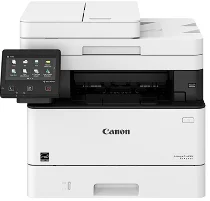
Canon imageCLASS MF424dw printer model is a monochrome printer with the ability to print black and white documents and produce excellent quality. At the same time, the core functions of this machine involve standard printing, copying, scanning, sending, and faxing. The Canon imageCLASS MF424dw also comes with a valuable internal driver for automatic duplex printing on both sides of a paper. Meanwhile, its control panel consists of a 5-inch color touch panel with an internal memory of 1 GB.
Canon imageCLASS MF424dw Drivers for Windows
e019116abc53b99c03a206308e2c520f3ded49f256043f6d66d4425dccabc2dc4f7fdf327e7c41e148234d1226c8d77f0faefe0c112f24a1d17931330112a036d8e463505298f05934015f45615c10b5a46fd76a8891d9656d2715be490786a96e0231df2bc994176723bf67b28263786b2b3e6ac5df81286842a78a1c27114d0a54440677db13a6306081b5281edd2265717657d96e00e05d61cab0fd6ab0b7ab06b4ca4e6b96740e86bc83f313b9da6af77fed24ede730682fd05be1c26baf0d4f501e637282f476f558da6d428a536f40bdaf69f972730f29ca6ed53bfe02a2bc8d3788b40a988e601879c7178b38569e43ea26256cddb57d63fac655fdecc60ae7abde74362ee1fc65c30bd9d6dbd210613ae7713e332cb28ca73d2602ce04d2e8b6f97ecdbf6149ef728dccd1e27a7ad604327a8fa2972b7d5b6323ac320f9c6406c46b234f582a575d1581efe532fa405c5390a18408e0a3cd074c96112d97ead841d426ddb38a488cfe967b2b49aa89286fcf271af0ce96685b45ad2c041d82c9bcc80559e68ff68c6ba4ad4b306aa68506bf8ce00e71b99fdb985558cfe557946e69a58fbd83d2cf6ff6641be9e10624362f28ec6d414790303e17c6ec252ebd13b65d30d03910b256ba25720b7f8f84ab958a3e343a9ff44c0198f93ae3a9bec19da4981fa9ffa55ea4f53d8846c5a1f2e740bf9ee2b1e5f1a7507a427b89bc8d04fad2cd44ff669aa188f9c594e14fa7a4377a6036d303db7140f3484d887fc334579b3dc3a8bc75da393a9e3965472a7d23778e61bd2de5b0bee2bfe0eb5da0704a1ead08d62abcaad77b93dbe9887cbbef1220fe9ac8b47ffa0993fe1355abd4a92e1f64fd2c59ed2fadbd86a63ad22776f06d63b753f56541fc0793ccc7bbcb9b575bde84842a172c08ca890a97938e35b82d0ff7c8cb0379b5de56033f3245fcb34e2e7b291a7aaa4c5c3810bb3294ae9cbdf27e8908830120e28f9a1833e68475afc71d7ef976dd021c8b8cdf16b52839422c8e9cfc5b6ae9a1d0b961fdd798587bb750d58bd88e2d4d862e5c59dbd8da495333aaf3a7cd41Canon imageCLASS MF424dw Drivers for macOS
96a508b8817dcf2f4b7b59ad21e195a640c540ff08a6411639aa7834d23e0743cb41803f7db3dba7467715a8b0eb892c101e0c4c2dd082f285dfd820d8f432a36ad260f511b97e8c3121c13e74d8266d5288007f6a56b64927f5f675629ac29db6ddb33c456e76b77c69654f2216908bce41d1c2f4c7b496f268dd5603748e0935223b2977d71ab373eafd6f14f28daa933cd2dcdc4b0d818da4a4432b14366879b3e920a4196ee4aaf6d17c5a095266ecf44e51626bd2902b01fa785dcd4075d5f10278e0dd91a898757299adb4a566e5f14e6ad073c885da268768b7b8172eff5d80d992a0f8b003104ffdc1bdf36bfe8bce0aa49cce77b27cdc9a95a5776c86d5330d84af4dcc7458630c4999aae2495eebf5e1e3c6688e6e7c0453cb25a16708a180dad9484c82047dc4624ec4b3dd3438231e6ac5cbcdba793755e1ddb45efcaeccd8b1f1103d2bb966199a47fc50f0116996d987bd51178d61474c215169ef5f30da4c92762d2a5b614957892f1b542e16a07d53fec92f92bc3051fe328a9fe8a3ad9ee02fb65e10e05eda1e6d8e6ba268fa987a6e164d5ba661bb1240917e7c7089148ed46d637656f66159b2042287e9084b2b921ae5b5f5c0eb0e48c5875b37125b8c8a32cad84148bab04417f7abf39551d213d21db0084be432ccddd1a155fe623f7f913e5bf860233ad73ccaaa5a5814b9b1e9353dd6501d88f7c5310bca335d137d5d319b3536e7bd3bca38355c1bd03236c03a8c33fc0acd3e0297641744ea447acd804af112d0693e6588ba52e03feaf0d3150446eb3e84f5Canon imageCLASS MF424dw Drivers for Linux
d58796ee5518feee485119683cf7caa705668652803b8f0fb60177472ebe6d3bCanon imageCLASS MF424dw Specifications
Connecting with this machine often works through a standard USB 2.0 port (host and device) and Wi-Fi Direct connection. Others include the 10/100/1000 Base-T Ethernet (Network). As standard, its input tray can hold up to 350 sheets of plain paper while the maximum is 900 sheets. In addition, it contains a standard 250-sheet paper cassette and a stack bypass of 100 sheets. It can also work with an optional paper tray that can hold about 550 sheets of plain paper.
However, the Canon imageCLASS MF424dw device’s output paper tray can hold up to 65 sheets of printed copies with an average weight of 20 lbs. Its supported media types include the stack bypass, plain, thin, recycled, bond, thick, label, and envelopes. Other sizes are letter, legal, executive, and statement. The warm-up time when using this machine is about 14 seconds or less from the power-on mode. But when warming up from the sleep mode, it takes about 4 seconds or less.
The standard desktop dimensions for this device include a width of 19.5 inches, a height of 28.6 inches, and a depth of 35.7 inches. Moreover, the average weight of the machine only is about 35.8 lbs, which is equivalent to 16.2 kg. In printing, the compatible print method is laser beam printing technology. Also, it supports a print speed of up to 40 pages per minute (ppm) for letter-sized paper.
Technical Details
| Title | Canon imageCLASS MF424dw Drivers |
|---|---|
| Device Type | All-in-one printer |
| Driver Version | Varies by driver and operating system |
| Available Downloads | Drivers |
| License | Free |
| Manufacturer | Canon Inc. |