
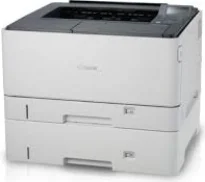
The Canon imageCLASS LBP8780x model of printer uses the monochrome laser beam print technology with on-demand fixing. This rate also follows the paper size in use as well as the complexity of the document in print. For instance, this machine, when printing on A4 and A3 paper, runs at 40 and 20 pages per minute (ppm), respectively. The same rates apply for the duplex mode, which allows the machine to print on both sides of the paper.
Canon imageCLASS LBP8780x Drivers for Windows
d8e463505298f05934015f45615c10b5a46fd76a8891d9656d2715be490786a96e0231df2bc994176723bf67b28263786b2b3e6ac5df81286842a78a1c27114d0a54440677db13a6306081b5281edd2265717657d96e00e05d61cab0fd6ab0b7ab06b4ca4e6b96740e86bc83f313b9da6af77fed24ede730682fd05be1c26baf0d4f501e637282f476f558da6d428a536f40bdaf69f972730f29ca6ed53bfe02a2bc8d3788b40a988e601879c7178b38569e43ea26256cddb57d63fac655fdec64e44aa350b529a66bd231af6902423a022db12268f6c535a88e9095473bd9fb23d81f5345fe18341a46cda9685998ac34bb4e9d83646bb5db3f3031bed8d400c60ae7abde74362ee1fc65c30bd9d6dbd210613ae7713e332cb28ca73d2602ce03d06cd9ccd69ae52631051dd223d09446d268467e073d875d526e6836c6aabf59bca599d9dfe2fc4b60473538828c70aa797ba871b9a86c0299ac83ce6123e23f4fd16fa6cdc14b041014fb334ae000c9dd07b5fb4f1cff611920fe8a1fd1941f50404ce941c1de922df5a0ec3bd64a12d29816a5f744031ebcda6e0ac5aeef04d2e8b6f97ecdbf6149ef728dccd1e27a7ad604327a8fa2972b7d5b6323ac3229a6ed42bbf5cd6d81f86c8833369c84fdd219eccdfb75db51f8253a8b8f7c4d4a98330af919b0fac3a1a441d032f5850a117403e84f288e284d681df52a13be2fc5d695d5a90c870505748cf09fa944f64d9d731257651dae8d32af4134a9d10dcd01f780afdd8ea6159f16beace40bd5a7f313268f194ec60fb5f4b8a813bbfaf3b14fd344e4824698372d4669b7a90aba0822f5c3b317a3608b90842f857484c3f334b0f856222b8eed352c7ba34b7b81539648effe54499b3e74fab8d5590cbcdc48fadbe7ec928ffd8b05bb6813ea056ad9d4b3e7473fa76dd1f5d1de72f68c3dfadf181b5613fa1622383ccf14566b02d160aa7f01941d10aee6bc386ebbbc3d5cce35c4598a3f2b7f62c1d191c66a78f5bacdd7ee915f7c61e2771dbf5ce34dce406f36dd4468fa4e86676ad211a0ebe5026fd2007168c92b420d76518489588dc560880fa58e7af3f4a0b67d115b55dfbf3ee02e20ba4e64f1a399d30f9c6406c46b234f582a575d1581efe532fa405c5390a18408e0a3cd074c96112d97ead841d426ddb38a488cfe967b2b49aa89286fcf271af0ce96685b45ad2c041d82c9bcc80559e68ff68c6ba4ad4b306aa68506bf8ce00e71b99fdb985558cfe557946e69a58fbd83d2cf6ff6641be9e10624362f28ec6d414790303e17c6ec252ebd13b65d30d03910b256ba25720b7f8f84ab958a3e343a9ff44c0198f93ae3a9bec19da4981fa9ffa55ea4f53d8846c5a1f2e740bf9ee2b1e5f1a7507a427b89bc8d04fad2cd44ff669aa188f9c594e14fa7a4377a6036d303db7140f3813d953b761ca70a8d70c2bdd2180478b09313620848f4b541c40880091153936a86d8853cc41e26974731a64e63139f24ef01c6bf602ec1a19c74bce55cae18484d887fc334579b3dc3a8bc75da393a9e3965472a7d23778e61bd2de5b0bee22de53dbdd53cae4b58941fad955d291f8b2889cdd6f8d5550b67fdf46185ce3a4fa53803288d165780e30642620fc733296058518e7ae460c263a77588ae1f8bCanon imageCLASS LBP8780x Drivers for macOS
883486e9090fa71b21286a676ceb6794224b0e5126260c6bcab8be3f3bab9b03f836e8cce717a80e3cca62ac92d824cd138923ef4a4f05c80dc7f449bafc98e69cb40f3853c3fade0a2f8063dfad5ffb6919e879b5b19968938321bd5c139db5804989950b94f64b85160213d11a5259c082d1312c1f627a0812ee349ad6245f8c3891f63d4e6b9d23a613adb34a803bd4b45593d9fc0ca658465a0aba1a7ff3646aaa66b64a8416492c4abf846958b255a596204cbd7db738b975103f543f503cac8d47a0bb1580e74b492bc876858781092e8fae8a009946dc72a2194c0ca96b581313eec6df01b8ad51715b70513f5b2a2cb26467a41d34966d7b57f74f963accb0f153300092a2ee312825c851035f1c66d65dafd67c77e2d4fbcd27c13a312dad7b42625ee423180149805c7ec4e10d238d7ee98b777e766374df0576c85c70ce408e9af249acb1d961605a3c4e4741913910cc53c3a562af0ca8c76e6eb3a91af1f32651926bea385706e66a9224b8471985df9e1f9d051d98d6da7b6301a221888cc3651a64f633e461870d1e2d0cce0ef54abb9c8317ca085ad2196494292469e0acf79d6f42d1ee69f08969d05241d73a3b0845a32aaa2fe1c08f5d22777e10690dcebdae80b6ec50e7bed2b28b71ca4cf9315646912ab2ad21c066702b8d833f5f41ec87cd5b357b1b9ddd3bb3d1b09a3768321db602239d777492c0f30b290384f17a632ab8d1bb4aaeb3589d0088456996795300daf6874e757f48161d9708c89c3e6582c1998ff8f43602df6e3a91aa8f4f1b5bfa1a7cd1078aCanon imageCLASS LBP8780x Drivers for Linux
dfd33db96aacd96ba06c0f5bfa11fa9f5d368ef520100c6e5abf900539592e7eCanon imageCLASS LBP8780x Supported Toner Catridges
Toner Catridge 333 : Yield Approx. 10,000 Pages
Catridge 333H : Upto yield 17,000 Pages based on ISO/IEC Standard
The printer resolution is about 600 x 600 dots per inch (dpi), but this resolution is optimizable. With the use of an image refinement enhancer, the resolution can reach 1200 x 1200 dpi. At other times, the resolution can be up to 2400 x 600 dpi. The warm-up time for the machine from the power ON mode is 29 seconds or even less. Also, while the printer is recovering from the deep sleep mode, it takes about 10 seconds or even less.
The compatible print language includes UFR II, PCL 5e, postscript 3, PDF, and XPS. This Canon imageCLASS LBP8780x machine supports standard fonts that provide for 93 PCL fonts and 136 fonts for PS or PDF. It also supports auto duplex printing and the use of an automatic document feeder (ADF). The compatible paper sizes include A3, A4, A5, B5, A4R, ledger, letter, and legal-sized paper. It also supports print margins of 5 mm at the top, bottom, left, and right sides of the article.
In terms of paper handling, the standard input cassette can hold up to 250 sheets of plain paper. The multipurpose tray will hold up to 100 sheets within a weighing range of 60 to 90 gsm. The extra paper feeder can hold up to 550 sheets of plain paper in a maximum of 3 units.
Technical Details
| Title | Canon imageCLASS LBP8780x Drivers |
|---|---|
| Device Type | Printer |
| Driver Version | Varies by driver and operating system |
| Available Downloads | Drivers |
| License | Free |
| Manufacturer | Canon Inc. |